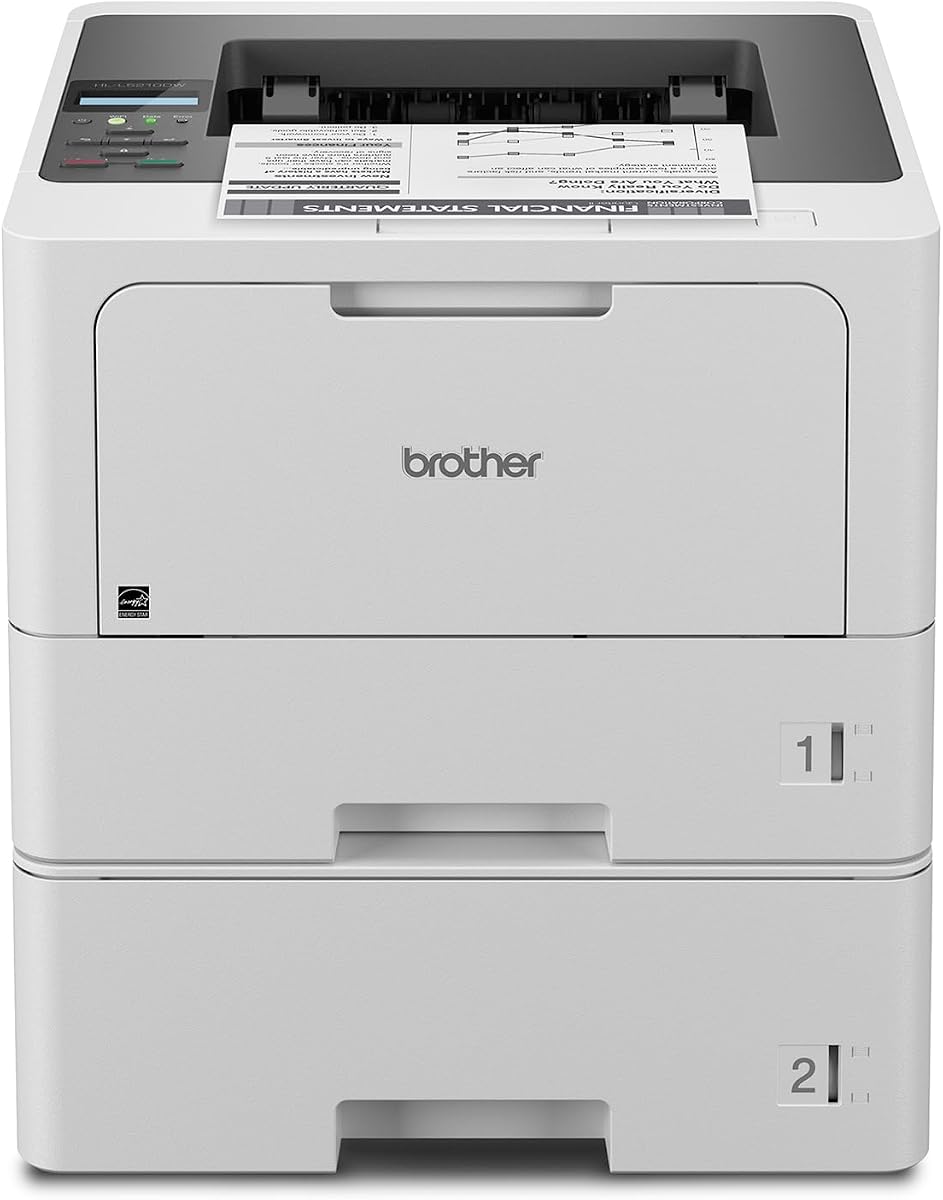
Brother HL-L5210DWT
4.3Editor score
Up to 48ppm print speed
Dual paper trays standard
Gigabit Ethernet included
This guide compares the top 10 laser printers for large workgroups, evaluating speed, security, paper capacity, and total cost of ownership to help IT teams
Choosing the right laser printer for large workgroups is a critical decision that impacts daily productivity and operational costs. Teams need machines that handle high volumes without jamming, offer robust security to protect sensitive data, and provide fast speeds to keep workflows moving. The ideal model balances performance with reliability.
We evaluated ten leading models from top brands like Brother and HP based on rigorous criteria including print speeds, paper handling capacity, network connectivity options, and enterprise-grade security features. Our analysis focuses on real-world performance metrics that matter most to busy office environments and IT administrators managing multiple devices.
Each pick below details specific strengths and trade-offs to help you match a printer to your team's unique needs and budget constraints. Note that pricing and availability fluctuate regularly so always verify current details before purchasing to ensure you get the best value for your investment today.
4.3Editor score

4.4Editor score

The following table provides a side-by-side comparison of all ten models evaluated in this guide allowing you to quickly assess key specifications like print speed paper capacity and connectivity options across the entire lineup.


The Brother MFC-L8930CDW stands out as a top contender for large workgroups needing reliable color printing. With a strong user rating and comprehensive features it delivers professional results while maintaining efficiency for busy teams.
We may earn a commission when you buy through this link, at no additional cost to you.
This model offers fast print speeds up to 33 pages per minute for both color and black documents. Its two-sided scanning speed reaches 104ipm allowing quick digitization of large documents. The built-in dual-band wireless and Gigabit Ethernet ensure seamless network connectivity for multiple users.
While it costs more upfront the included toner and low operating costs provide long-term value. The only trade-off is the initial complexity in setup but the touchscreen guides users through configuration steps easily.
This printer is ideal for marketing teams or offices requiring high-quality color output regularly. Its security features make it suitable for businesses handling sensitive documents daily.
The high-speed scanning and duplex capabilities reduce manual handling time significantly for document processing teams.
Triple Layer Security and NFC card readers help maintain strict access control over printed sensitive materials.
We may earn a commission when you buy through this link, at no additional cost to you.
The Brother HL-L5210DWT provides exceptional value for teams needing fast black and white printing. Its combination of speed and paper capacity makes it a strong choice for general office use without sacrificing security or connectivity.
We may earn a commission when you buy through this link, at no additional cost to you.
Print speeds reaching 48 pages per minute ensure that large print jobs finish quickly without bottlenecks. The dual paper trays totaling 770 sheets standard reduce refilling interruptions. Gigabit Ethernet and dual-band wireless keep the device accessible for all network users.
Although it lacks color printing the high yield toner cartridges keep cost per page low. The lack of a touchscreen is compensated by straightforward menu navigation and mobile printing support.
Purchase this printer for departments focused on document volume rather than color graphics. It is a reliable workhorse for administrative and legal teams needing fast reliable output.
Dual trays allow continuous printing without frequent user intervention during high demand periods.
Super high-yield toner reduces frequent replacements and operational expenses over time.
We may earn a commission when you buy through this link, at no additional cost to you.
The HP LaserJet Enterprise M406dn is designed for straightforward enterprise deployment. Its security features and firmware update path ensure long term reliability and protection for connected office environments.
We may earn a commission when you buy through this link, at no additional cost to you.
Print speeds reach 42 pages per minute offering quick turnaround for standard documents. Built-in Ethernet guarantees stable network performance while Wolf Enterprise Security protects against malware threats continuously. FutureSmart firmware allows adding new features over time.
The absence of wireless connectivity might require cabling adjustments but ensures consistent network speed. The basic display limits customization but simplifies maintenance for IT staff managing many devices.
Choose this unit for secure corporate environments where wired networks are preferred. It serves well in IT departments or secure facilities needing reliable managed printing without extra complexity.
Defensive layers detect and self-heal from attacks to keep sensitive business data safe.
Firmware updates extend device lifespan by adding new capabilities without hardware changes.
We may earn a commission when you buy through this link, at no additional cost to you.
The Brother MFC-L6810DW delivers outstanding speeds for a monochrome all-in-one device. Its combination of print and scan throughput makes it a productivity powerhouse for large teams processing heavy document loads daily.
We may earn a commission when you buy through this link, at no additional cost to you.
Print and copy speeds reach 52 pages per minute ensuring rapid completion of large jobs. The 80-page auto document feeder supports two-sided scanning up to 200ipm which is exceptional for digitizing records. Voice assistant integration allows convenient status checks and printing tasks.
Paper capacity is easily expandable to reduce manual refills during peak hours. The limited touchscreen functionality may not appeal to all users but core printing features remain robust and reliable.
Ideal for warehouses or logistics teams needing fast monochrome output. Its speed and capacity support continuous operations without frequent pauses for paper or toner management.
Dual-pass ADF reduces scanning time for thick stacks of documents significantly.
Alexa compatibility provides easy remote management of printer status and jobs.
We may earn a commission when you buy through this link, at no additional cost to you.
The Brother HL-6210DW focuses on core printing excellence for teams that do not need scanning. Its speed and connectivity options make it suitable for distributed teams needing reliable network printing across floors.
We may earn a commission when you buy through this link, at no additional cost to you.
Print speeds up to 50 pages per minute deliver quick results for busy users. Built-in Gigabit Ethernet and dual-band wireless ensure stable connections regardless of network infrastructure. High-yield toner reduces operational costs significantly over time.
Lacking scanning features keeps the price lower but limits its utility as an all-in-one. This trade-off is acceptable for departments with separate scanners or centralized scanning resources.
Buy this for teams needing a dedicated network printer without extra functions. It supports high-volume text printing needs efficiently for administrative or support staff.
High speed output ensures consistent performance during busy office periods.
Dual wireless and wired options support various office network setups.
We may earn a commission when you buy through this link, at no additional cost to you.
The Brother MFC-L5915DW balances speed and scanning capability for general office use. Its performance metrics support daily printing and scanning needs without compromising on network connectivity or security standards.
We may earn a commission when you buy through this link, at no additional cost to you.
Print speeds reach 50 pages per minute ensuring quick delivery of hard copy documents. The 70-page ADF with single-pass two-sided scanning simplifies document digitization tasks. Low-cost output via high-yield toners keeps ongoing expenses manageable.
Scanning throughput is decent but not industry-leading for very large batches. This model suits teams with moderate document processing needs who want one device for printing and scanning.
Choose this for small to mid-sized departments needing versatile all-in-one functionality. It works well for finance or HR teams requiring regular document handling.
Single-pass scanning reduces jams and speeds up digitizing of multi-page documents.
Low cost output helps manage departmental printing budgets effectively.
We may earn a commission when you buy through this link, at no additional cost to you.
The HP LaserJet Enterprise M507n prioritizes security and management for corporate environments. Its extensive security features and centralized control make it a safe choice for organizations with strict compliance needs.
We may earn a commission when you buy through this link, at no additional cost to you.
Over 200 embedded security features protect against malware and data breaches continuously. Web JetAdmin allows IT teams to manage multiple devices from one interface efficiently. Mobile printing works without apps supporting modern BYOD environments.
The absence of wireless connectivity limits placement options but ensures secure wired performance. Basic controls suit IT professionals who prefer remote management over local interaction.
Select this for regulated industries requiring strict device management. It is ideal for banks or government offices needing guaranteed security and easy fleet management.
Strong security features meet strict industry standards for data protection.
Centralized tools simplify updates and policy enforcement across many devices.
We may earn a commission when you buy through this link, at no additional cost to you.
The HP LaserJet Enterprise MFP M634z offers top-tier performance for demanding environments. Its speed and paper capacity reduce interruptions during peak hours making it suitable for large corporate centers.
We may earn a commission when you buy through this link, at no additional cost to you.
Print speeds reach 55 pages per minute ensuring rapid output even for huge jobs. The 2300-sheet total capacity supports weeks of operation without refills. A 150-page ADF with single-pass scanning handles large documents efficiently.
High cost is justified by productivity gains and energy efficiency features. The large footprint requires dedicated floor space which limits placement options in smaller offices.
Ideal for central printing hubs or high-volume departments. Organizations needing minimal downtime and maximum throughput benefit most from this premium device.
Massive paper capacity ensures continuous printing for large teams without pauses.
Stapler/stacker streamlines finishing for large document sets automatically.
We may earn a commission when you buy through this link, at no additional cost to you.
The Brother HL-L8430CDWT delivers reliable color printing at a competitive cost. Teams needing vibrant marketing materials or color charts benefit from its quality without high expenses.
We may earn a commission when you buy through this link, at no additional cost to you.
Print speeds up to 33 pages per minute support both color and black tasks. Dual trays allow mixing paper types easily. Toner costs are low due to super high yield options reducing total cost of ownership.
It is slower than monochrome models but acceptable for color workflows. The sustainable packaging and EPEAT rating appeal to eco-conscious organizations.
Buy this for creative teams needing affordable color printing. It fits well in offices needing frequent color documents without investing in enterprise solutions.
Sharp output meets professional needs for visual presentations.
Sustainability features reduce environmental impact of office operations.
We may earn a commission when you buy through this link, at no additional cost to you.
The Brother HL-L6310DW supports heavy workloads with speed and capacity. Its deployment tools help IT teams manage multiple units across different floors easily.
We may earn a commission when you buy through this link, at no additional cost to you.
Print speeds reach 52 pages per minute for quick delivery of documents. Large paper capacity reduces manual refills significantly. Voice assistant compatibility allows easy status checks during busy times.
Monochrome output limits use to text documents but performance remains high. Floor standing configuration needs space but optimizes ergonomic access for staff.
Choose this for large teams requiring consistent high speed output. It works best in open offices needing reliable network printing for many users.
Device management tools simplify configuration across many networked units.
Floor standing options reduce bending and improve user accessibility.
We may earn a commission when you buy through this link, at no additional cost to you.
Selecting the right laser printer requires understanding your team's volume needs security requirements and budget. This section breaks down key factors to help you evaluate models effectively.
Print speed directly impacts how quickly teams get documents. Large workgroups should look for speeds above 40ppm to avoid bottlenecks during peak hours.
Prioritize models with 50ppm or higher for high volume environments.
Large teams need printers that run long without refilling. Look for models with 500+ sheet capacity or expandable trays.
Choose expandable options to reduce downtime during busy periods.
Business printers face constant security threats. Enterprise models include features like NFC authentication and malware detection to protect data.
Ensure the model supports triple layer security or equivalent protections.
Teams need flexible printing from various devices. Gigabit Ethernet ensures stable speeds while dual-band WiFi supports mobile printing.
Select models offering both wired and wireless connections for versatility.
Beyond purchase price consider toner costs and energy usage. High-yield cartridges reduce cost per page significantly over time.
Check page yield ratings to calculate long term expenses accurately.
If digitization is required choose an all-in-one model with a large auto document feeder. Single-pass two-sided scanning saves time.
Prioritize ADF capacity over 70 pages for high volume workflows.
IT teams need remote configuration and monitoring tools. Features like device management software simplify fleet maintenance.
Choose models compatible with your existing management platform.
Large printers require dedicated floor space. Consider the size and weight before purchasing especially for smaller rooms.
Measure your workspace to ensure the model fits comfortably.
To ensure optimal performance always use the manufacturer recommended toner cartridges and paper. This prevents jams and maintains print quality over time.
Schedule regular firmware updates through the network management tools to keep security features current and functional for all users.
Clean the exterior and rollers weekly with a dry cloth to prevent dust buildup that can affect paper feeding reliability.
Speed reduces wait times when multiple users send jobs simultaneously. A faster printer ensures documents are ready quickly increasing overall office productivity significantly.
It refers to a comprehensive security suite that protects data at the device network and transit levels. This helps prevent unauthorized access to printed documents.
While generic cartridges are cheaper they may void warranties or cause print quality issues. Using genuine high-yield cartridges ensures reliability and consistent performance.
Wireless connectivity allows printing from mobile devices and laptops without cables. For modern offices this flexibility is essential for efficient daily operations.
Use centralized management tools like Web JetAdmin or built-in dashboards to update firmware and monitor toner levels remotely across all devices.
Look for at least 1000 sheets total capacity or expandable trays. This reduces frequent refilling interruptions during busy work hours.
If your team regularly needs marketing materials or charts yes. Otherwise monochrome is cheaper to operate and faster for standard documents.
With proper maintenance and regular firmware updates most enterprise models last 5 to 7 years. High yield toner and paper trays extend usable life.
The Brother MFC-L8930CDW leads as the top overall choice offering speed and color. The HL-L5210DWT saves money for pure speed while the HP M634z handles massive volume.
Focus on speed security and paper capacity when narrowing down choices for your team. These three factors directly influence daily workflow efficiency and user satisfaction.
Always verify current pricing and stock before buying since deals change frequently. Matching the right model to your workflow needs ensures maximum value.