
8-Port 10G SFP+ Switch, Layer 3 Managed, Enterprise Network Fiber Switch
4.7Editor score
8x10Gbps SFP+ Ports
Fanless Silent Operation
Static Routing Support
Discover the top 10 Layer 3 Network Switch options for enterprise and home labs. We compare features, performance, and reliability to help you choose the right
Layer 3 network switches are essential for modern networking environments that require intelligent traffic management and routing capabilities. These devices go beyond simple connectivity by analyzing IP addresses to direct data packets efficiently across different subnets and VLANs.
We evaluated ten leading models based on port configurations, routing protocols, management interfaces, and build quality. Our analysis covers everything from compact home lab units to robust enterprise-grade solutions designed for high-throughput data centers and professional studios.
Each pick in this list highlights specific strengths such as PoE availability, SFP+ uplinks, or silent operation. Please note that prices and availability fluctuate frequently so verify current details before making your final purchasing decision for your network infrastructure.
4.7Editor score

4.7Editor score

4.7Editor score
The following table provides a side-by-side comparison of all ten selected Layer 3 network switches. Review the key specifications to identify which model aligns best with your bandwidth requirements and deployment environment.

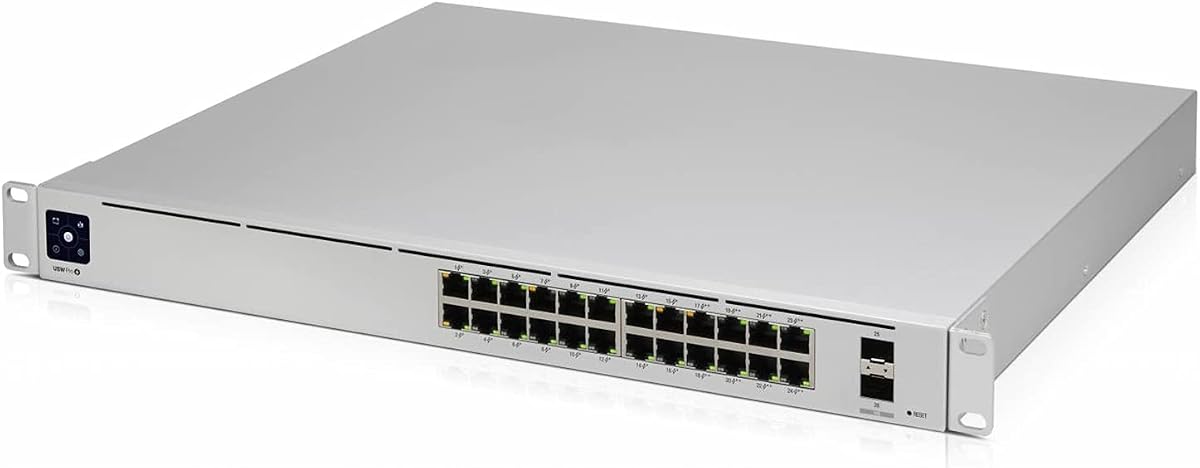




This Ubiquiti switch stands out as a top-tier choice for professionals needing robust Layer 3 capabilities within the UniFi ecosystem. It combines high-performance routing with extensive Power over Ethernet support to simplify complex network deployments significantly.
We may earn a commission when you buy through this link, at no additional cost to you.
The device delivers reliable connectivity through its 24 ports which handle both data and power for connected devices. Users benefit from intuitive management tools that streamline VLAN configuration and traffic monitoring without requiring deep command-line expertise.
While the cost is higher than basic switches the investment pays off in reduced maintenance and superior stability. Some users may find dependency on the UniFi platform limits flexibility if they plan to migrate to other brands later.
Businesses and tech enthusiasts invested in Ubiquiti hardware will find this switch an ideal core component. It balances performance ease of use and advanced routing features to meet demanding enterprise or prosumer networking requirements effectively.
The UniFi interface provides a centralized dashboard for monitoring traffic and configuring routes across the network effortlessly.
Built-in PoE allows you to power access points and cameras directly from the switch reducing cable clutter.
We may earn a commission when you buy through this link, at no additional cost to you.
The MokerLink switch offers an impressive entry point into high-speed 10G networking with comprehensive Layer 3 management tools. It supports auto-adaptive rates ensuring compatibility with various devices while maintaining efficient data throughput.
We may earn a commission when you buy through this link, at no additional cost to you.
Its security suite includes dynamic ARP inspection and storm control to protect against common network threats. Administrators can leverage CLI or web interfaces for precise control over routing tables and VLAN settings to optimize traffic flow.
The active cooling fan ensures stability under heavy loads but may introduce noise in quiet environments. While the feature set is robust users new to managed switches might need time to navigate the configuration options thoroughly.
Ideal for small businesses or studios needing 10G speeds without enterprise pricing this unit delivers solid value. Its metal construction and flexible mounting options make it a durable addition to any growing network infrastructure.
Advanced protections like DoS anti-attack and port security help safeguard your network from unauthorized access.
Each port adjusts to 10G 5G or 2.5G speeds automatically allowing mixed device connections seamlessly.
We may earn a commission when you buy through this link, at no additional cost to you.
This model provides the same robust Layer 3 switching capabilities as its PoE counterpart but at a lower cost. It is perfect for setups where devices are powered separately or where PoE budget is managed by a dedicated injector.
We may earn a commission when you buy through this link, at no additional cost to you.
The built-in power supply ensures stable operation without external bricks while the 24 GbE ports handle heavy data traffic efficiently. Users can leverage optical fiber media support for long-distance connections without signal degradation in larger facilities.
Without PoE capability users must plan their cabling to include power sources for devices like cameras or phones. This trade-off allows significant savings on hardware costs for networks that do not require power delivery through the switch ports.
Tech enthusiasts and IT professionals looking to optimize budget while maintaining performance will appreciate this unit. It remains a strong choice for core switching duties where power delivery is handled independently by other network equipment.
Support for optical fiber media ensures reliable long-distance connections suitable for campus or large office environments.
Standard rack mounting features help organize wires and secure cables for a professional and tidy installation.
We may earn a commission when you buy through this link, at no additional cost to you.
This switch combines future-proof 10G uplinks with versatile 2.5G ports and high-wattage PoE++ delivery. It is engineered for environments requiring substantial power to devices like Wi-Fi 7 access points while maintaining high throughput speeds.
We may earn a commission when you buy through this link, at no additional cost to you.
Advanced Layer 3 management features allow static routing and OSPF configuration via console or web UI. The rugged metal housing and active cooling system ensure durability during continuous operations under heavy thermal loads.
The active cooling fan keeps internal components cool but may generate noise in silent office zones. Users should also account for the mix of port speeds when planning network topology to avoid potential bottlenecks or configuration confusion.
Ideal for creative studios or tech labs needing robust power and speed this switch delivers enterprise features at mid-range pricing. Its support for lightning protection adds critical security for outdoor or high-risk network connections.
Ports 1-4 support up to 90W allowing power-hungry devices to run without external power adapters.
Granular control via CLI and web UI ensures precise traffic segmentation and security enforcement.
We may earn a commission when you buy through this link, at no additional cost to you.
MikroTik switches are known for their powerful RouterOS software which offers deep customization for network administrators. This model balances compact size with significant 10G throughput making it suitable for small offices or rack space constrained environments.
We may earn a commission when you buy through this link, at no additional cost to you.
The four SFP+ ports provide excellent uplink flexibility while the remaining ports handle standard Ethernet connections. Administrators benefit from a mature ecosystem of tools that support complex routing and firewall configurations out of the box.
Users unfamiliar with RouterOS may find the interface less intuitive than standard web panels requiring study time. However for those seeking deep control and reliability the hardware quality and software capabilities justify the initial learning investment.
Network professionals who need a reliable small form factor switch with advanced routing capabilities will find this ideal. It serves well as an aggregation point for 10G traffic in data centers or high-performance home labs.
RouterOS provides extensive scripting and automation options for managing complex network environments efficiently.
Multiple 10G SFP+ slots allow for direct fiber connections to servers and storage arrays.
We may earn a commission when you buy through this link, at no additional cost to you.
Designed specifically for fiber-heavy networks this switch offers sixteen SFP+ ports in a compact 1U chassis. It allows organizations to consolidate multiple fiber connections without sacrificing routing capabilities or management features.
We may earn a commission when you buy through this link, at no additional cost to you.
The included console port provides direct access for configuration even when network services are down. Standard 802.1Q support ensures compatibility with existing VLAN setups across heterogeneous network environments.
Dependence on SFP+ modules means additional costs for transceivers compared to built-in copper ports. Users should verify module compatibility to ensure optimal performance across different fiber optic standards used in their infrastructure.
Data centers and network operators prioritizing fiber connectivity will appreciate this high-density design. It delivers robust managed switching and Layer 3 routing in a form factor optimized for rack space efficiency.
Sixteen SFP+ slots support high bandwidth connections necessary for backbone and uplink requirements.
IEEE 802.1Q compliance guarantees standard VLAN tagging across different vendor equipment seamlessly.
We may earn a commission when you buy through this link, at no additional cost to you.
This large format switch provides forty-eight gigabit ports for extensive connectivity needs alongside four 10G SFP+ uplinks. It is designed for environments requiring numerous wired connections while maintaining robust Layer 3 routing capabilities.
We may earn a commission when you buy through this link, at no additional cost to you.
The built-in touchscreen display offers immediate status updates and quick configuration access without a computer. Seamless integration with UniFi controllers allows for centralized monitoring of traffic and device health across the entire network.
While powerful the unit draws significant power which may increase operational costs over time. Some users report occasional software quirks that can impact the user experience despite generally reliable hardware performance.
Large offices or campuses needing dense wired connections will find this switch highly capable. The combination of physical display and remote management tools offers flexible administration options for IT teams.
The onboard touchscreen allows quick port status checks and reboots without remote login.
Large port capacity supports growth without adding extra devices to your network switch.
We may earn a commission when you buy through this link, at no additional cost to you.
This fanless switch delivers high-speed 10G connectivity without the noise of active cooling fans. It is ideal for quiet spaces like home offices or creative studios where acoustic comfort is a priority alongside performance.
We may earn a commission when you buy through this link, at no additional cost to you.
Layer 3 features like static routing and OSPF allow inter-VLAN routing without taxing your main router. The rugged metal chassis helps dissipate heat passively ensuring stable operation even under moderate workloads.
Passive cooling limits thermal headroom during sustained maximum loads compared to active cooling units. Additionally the lack of PoE means connected devices must be powered separately or via injectors.
Quiet workspace users seeking affordable 10G networking will appreciate this silent design. Its reliable performance and compact form factor make it a great choice for desktop or wall-mounted installations.
Fanless operation ensures zero noise making it perfect for quiet offices and bedrooms.
OSPF and static routing allow advanced traffic management without needing a separate router.
We may earn a commission when you buy through this link, at no additional cost to you.
This Pro Max switch brings modern 2.5G speeds to the UniFi ecosystem without PoE capabilities on all ports. It is built for environments needing faster than Gigabit connections to servers or storage devices.
We may earn a commission when you buy through this link, at no additional cost to you.
The management interface integrates smoothly with other Pro devices allowing unified monitoring of network health. Users benefit from robust VLAN and QoS features to prioritize critical traffic across different applications.
Lack of PoE on certain ports means extra adapters for cameras or access points. While the price is higher the performance gains over standard Gigabit justify the cost for performance-conscious users.
IT professionals and enthusiasts upgrading from legacy hardware will find this switch a valuable asset. It bridges the gap between current Gigabit setups and future-ready multi-gigabit infrastructure effectively.
2.5G ports allow faster file transfers for modern network interface cards.
Integration with UniFi Pro tools provides a single view of all connected devices.
We may earn a commission when you buy through this link, at no additional cost to you.
This model combines high-power PoE++ with silent fanless operation and unique visual port indicators. It offers a premium experience for users needing both data and power delivery in a compact form factor.
We may earn a commission when you buy through this link, at no additional cost to you.
Etherlighting ports illuminate to show status making physical identification easier in dark racks. The 180W budget supports power-intensive devices without the noise of a cooling fan ensuring quiet operation.
The premium cost reflects the advanced features and build quality which may be steep for budget setups. Users must ensure compatibility with the UniFi ecosystem to utilize the full management potential.
High-end home labs and businesses needing reliable silent PoE will appreciate this switch. It delivers top-tier performance and usability for professional deployments requiring advanced monitoring capabilities.
Etherlighting LEDs show speed and status instantly simplifying physical cable management.
Fanless cooling ensures zero noise while maintaining thermal stability for connected devices.
We may earn a commission when you buy through this link, at no additional cost to you.
Selecting the right Layer 3 network switch involves balancing speed, power, and management capabilities with your specific environment needs.
Evaluate how many ports you need and whether they support 10G or 2.5G speeds. Higher speed ports are essential for modern high-throughput workstations and NAS devices.
Choose a model with enough physical ports to accommodate growth while avoiding overpaying for unused capacity.
If you power cameras or access points check the total PoE budget and wattage per port. Some models support PoE++ for heavier devices like PTZ cameras.
Ensure the switch provides enough power for all connected devices without needing external injectors.
Layer 3 switches offer CLI, Web UI, or dedicated app management. Choose based on your team's expertise and preference for command-line versus visual tools.
Consider ecosystem integration if you plan to use multiple devices from the same vendor for centralized control.
Look for support of OSPF, Static Routing, or VLAN routing features. These allow efficient traffic flow between different network segments without relying on external routers.
Advanced protocols are vital for complex networks needing dynamic routing paths.
Fans ensure cooling but create noise which may be problematic in quiet spaces. Fanless models are silent but may have thermal limits under heavy load.
Decide based on installation location whether silent operation or thermal performance is more critical.
Check if the switch supports rack mounting, wall mounting, or desktop placement. Standard 1U racks are common in server closets but flexible options help in offices.
Secure mounting protects equipment and keeps cabling organized.
Advanced switches offer ACLs, storm control, and ARP inspection to block attacks. Security features prevent unauthorized access to sensitive network data.
Always enable basic security protocols even in home setups to prevent internal threats.
SFP+ uplinks allow fiber connections for future scaling without buying new hardware. Ensure future growth paths are supported by available uplink ports.
Investing in expandable switches reduces long-term upgrade costs significantly.
Connect the switch to your modem or router using a high-quality Ethernet cable. Ensure all cables are securely seated in the correct ports for stable data transmission.
Log into the management interface using default credentials and change passwords immediately. Configure VLANs and IP settings to separate traffic and secure your network segments.
Keep the switch in a well-ventilated area and dust it regularly to prevent overheating. Regularly update firmware to ensure security patches and performance improvements are applied.
A Layer 3 network switch handles data forwarding based on IP addresses rather than just MAC addresses. This allows it to route traffic between different subnets and VLANs more efficiently than standard switches.
Most homes do not need Layer 3 features unless you manage multiple VLANs or subnets. If you have complex networking needs like separate guest networks or server isolation, it adds significant value.
Yes many Layer 3 switches include SFP+ slots for fiber optic connections. These allow high-speed data transfer over longer distances compared to standard copper cables.
Change default passwords, disable unused ports, and enable features like 802.1X authentication. Regular firmware updates also help patch vulnerabilities before they are exploited by attackers.
PoE++ delivers more power over Ethernet cables allowing devices like cameras and access points to run without separate power cords. It supports higher wattage standards like 802.3bt for demanding devices.
Fans cool internal components when high-speed processing generates heat. Fanless switches are quieter but may have lower performance limits under continuous heavy loads.
Web interfaces offer visual tools easier for beginners while CLI offers precise control for experts. Choose based on your technical comfort and the complexity of your network configuration.
Download the latest file from the manufacturer's site and upload it via the web UI or console. Ensure power stability during the process to prevent corruption or hardware failure.
We highlighted ten diverse options ranging from budget-friendly units to premium enterprise solutions with advanced PoE. Each model brings unique strengths in routing capabilities port speeds and management interfaces.
Prioritize your specific needs whether it is silent operation PoE budget or fiber uplinks before making a final decision. A well-chosen switch forms the backbone of a reliable and high-performing network.
Always verify current pricing and availability as stock levels change frequently on marketplaces. Investing in the right hardware today ensures your infrastructure remains ready for future data demands.