
HP Chromebook 14 x360 Plus
4.2Editor score
Flexible 360 degree hinge design
Intel N150 processor for daily tasks
WUXGA touchscreen with anti glare coating
Finding a great alternative to the MacBook means looking for reliable performance, long battery life, and a screen that feels premium without the premium price tag attached to every purchase.
We compared ten top models ranging from budget Chromebooks to powerful Windows laptops and even newer Apple options to find the best fit for students, professionals, and casual users alike.
Each pick below shows key specs, real-world pros and cons, and why it stands out in this competitive market while noting that prices can change quickly on major online retail platforms.
4.2Editor score

4.4Editor score

4.6Editor score
As an Amazon Associate we earn from qualifying purchases.
This side-by-side comparison highlights the key specifications and features of each top MacBook alternative to help you decide which device matches your workflow and budget needs best.


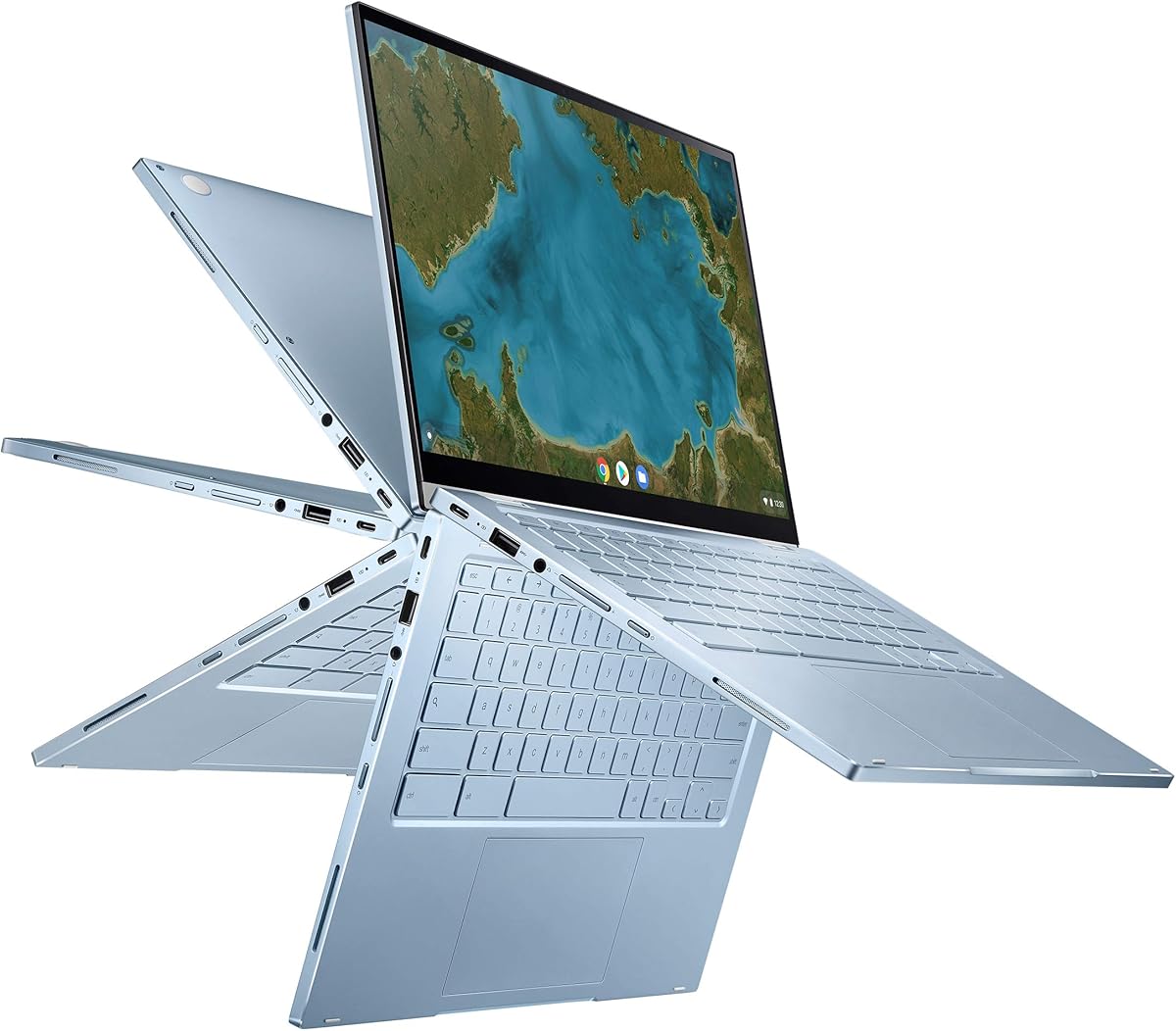


The HP Chromebook 14 x360 Plus is a budget-friendly device that offers flexibility with its 360 degree hinge and solid everyday performance for students and families.
We may earn a commission when you buy through this link, at no additional cost to you.
It features an Intel N150 processor and 4GB of LPDDR5 memory which handles web browsing and document editing smoothly while the 14 inch WUXGA touchscreen provides clear visuals.
While storage is limited to 128GB UFS and multitasking heavy loads may slow it down, these trade-offs are acceptable given the affordable price point and durable build quality.
Anyone looking for a simple, secure, and versatile laptop for online classes or casual home use should consider this Chromebook as a reliable alternative to more expensive systems.
The 360 degree hinge allows you to use it in laptop, tent, stand, or tablet mode for different tasks like watching videos or taking notes.
Powered by Chrome OS it offers automatic updates built-in security and cloud backup to keep your data safe and your system always up to date.
We may earn a commission when you buy through this link, at no additional cost to you.
The ASUS Chromebook Flip CX1 brings a balanced mix of features including 8GB RAM and a free Google One AI Premium plan making it a strong contender for productivity focused users.
We may earn a commission when you buy through this link, at no additional cost to you.
Its Intel Celeron N4500 processor handles daily tasks well while the 14 inch FHD NanoEdge display offers a thin bezel design for more screen space in a compact 3.59 pound chassis.
The main drawbacks are the relatively slow eMMC storage and the entry level CPU which may struggle with heavy multitasking but the long battery life and connectivity options offset these issues.
Students and casual users who need a durable convertible device with cloud storage benefits and good battery endurance will find this model a practical alternative to pricier notebooks.
Get a three month free subscription to Google One AI Premium which includes Gemini Advanced and two TB of cloud storage to enhance your workflow.
Built to US Military Grade MIL-STD 810H standards this laptop can withstand drops and bumps making it suitable for travel or classroom environments.
We may earn a commission when you buy through this link, at no additional cost to you.
The Samsung Galaxy Book4 2024 delivers serious performance with a ten core Intel Core 7 processor and 16GB of RAM which handles demanding business tasks and multitasking with ease.
We may earn a commission when you buy through this link, at no additional cost to you.
It features a 15.6 inch FHD IPS display with 100 percent sRGB color and a full size backlit keyboard with a numpad making it ideal for professionals who type extensively.
While the larger footprint makes it less portable than smaller ultrabooks and integrated graphics are not for gaming, the robust specs and up to twelve hour battery life justify its size.
If you need a powerful Windows laptop for work or school that rivals MacBook performance without the ecosystem lock-in this model is a top tier choice for value and capability.
The ten core CPU with two performance and eight efficient cores delivers up to 5.4 GHz speeds for fast application launches and smooth multitasking.
Enjoy multiple USB 3.2 ports HDMI v2.1 Ethernet jack and Wi-Fi 6E to connect all your peripherals and external displays without adapters.
We may earn a commission when you buy through this link, at no additional cost to you.
The Google Pixelbook Go is designed for mobility with a lightweight barely one kg build and up to twelve hours of battery life ensuring you stay productive all day unplugged.
We may earn a commission when you buy through this link, at no additional cost to you.
It uses an 8th Gen Intel Core processor with a fanless design that keeps it cool and quiet while the Hush Keys keyboard offers a comfortable typing experience for long sessions.
Although the processor is older and the price is higher than typical Chromebooks the exceptional build quality battery life and premium display make it a unique pick for travelers.
Users who prioritize portability and battery efficiency over raw power will appreciate this sleek Chromebook that feels great to carry and use in any environment.
Up to twelve hours of battery life lets you work through flights or meetings without carrying a charger while a twenty minute charge gives two hours of use.
Built-in Titan C security chip and automatic Chrome OS updates protect your data from threats while keeping the system fast and up to date.
We may earn a commission when you buy through this link, at no additional cost to you.
The Lenovo Flex 14 2-in-1 offers strong performance with an AMD Ryzen 5 processor and 12GB of RAM making it capable of handling creative work and multitasking smoothly.
We may earn a commission when you buy through this link, at no additional cost to you.
It features a 14 inch FHD touchscreen with an included active pen for drawing and note-taking and the true block privacy shutter keeps your webcam secure when not in use.
While it ships with Windows 10 which is nearing end of life and storage is 256GB SSD these are minor issues for the overall value and versatility of the convertible design.
Students and professionals who need a Windows laptop with pen input and good performance without spending a premium will find this device a solid and flexible option.
The included active pen lets you draw or take notes directly on the screen which is perfect for creative tasks or annotating documents.
A convenient privacy shutter allows you to physically close the webcam to prevent any unauthorized access to your camera feed.
We may earn a commission when you buy through this link, at no additional cost to you.
The ASUS Chromebook Flip C433 impresses with its thin 5mm bezels and a 14 inch display that fits in a smaller chassis offering a modern look and great screen real estate.
We may earn a commission when you buy through this link, at no additional cost to you.
It is powered by an Intel Core m3 processor with 8GB of RAM providing snappy performance for browsing and apps while the backlit keyboard helps with use in low light.
Storage is limited to 64GB eMMC which may fill up quickly with files but cloud storage and microSD expansion help mitigate this limitation for most users.
This model suits users who want a stylish portable Chromebook with a big screen feel and decent performance for everyday tasks without heavy local storage needs.
The 5mm ultra-narrow bezels allow a 14 inch screen to fit in a 13 inch laptop footprint making it compact and easy to carry.
The Intel Core m3 processor and 8GB RAM handle multiple tabs and apps with ease so you can stay productive without constant reloads.
We may earn a commission when you buy through this link, at no additional cost to you.
The Lenovo Flagship Chromebook uses a MediaTek Kompanio 520 processor that elevates performance for everyday tasks and offers Wi-Fi 6 connectivity for faster wireless speeds.
We may earn a commission when you buy through this link, at no additional cost to you.
It features a 14 inch FHD IPS touchscreen with narrow bezels and weighs only 2.86 pounds making it easy to carry for school or work while the Abyss Blue color is stylish.
The main limitations are 4GB RAM which can struggle with many open tabs and 64GB storage but these are manageable for web-centric users who rely on cloud storage.
This is a great choice for those seeking an affordable reliable Chromebook with modern connectivity and a good display for online classes or casual browsing.
The octa-core MediaTek Kompanio 520 processor is designed for class leading battery life and reliable performance in everyday computing activities.
With Wi-Fi 6 and Bluetooth 5.1 you get fast and stable connections for all your wireless devices without lag or drops.
We may earn a commission when you buy through this link, at no additional cost to you.
The Apple 2026 MacBook Neo 13-inch brings advanced AI tools and a vibrant Liquid Retina display with up to sixteen hours of battery life making it a top premium alternative.
We may earn a commission when you buy through this link, at no additional cost to you.
It uses an A18 Pro chip for seamless app performance and comes with a durable recycled aluminum enclosure available in four colors including Blush and Indigo for style.
The fixed 8GB unified memory and higher price are trade-offs but the exceptional battery life AI integration and seamless iPhone Mac connection justify the investment for many.
Users who want Apple Intelligence features a reliable ecosystem and all-day battery without buying high-end Pro models will find this Neo version a compelling option.
Apple Intelligence helps you write express yourself and get things done effortlessly with groundbreaking privacy protections at every step of the workflow.
See and control what is on your iPhone right from your Mac start emails and take photos across devices for a unified workflow.
We may earn a commission when you buy through this link, at no additional cost to you.
The Apple 2021 MacBook Pro with M1 Max chip is a professional powerhouse offering 64GB RAM and 2TB storage for demanding tasks like video editing and development.
We may earn a commission when you buy through this link, at no additional cost to you.
As a renewed product it has been inspected and tested to ensure no visible cosmetic imperfections and battery capacity exceeds eighty percent which provides reliability for the price.
While the price is higher than typical alternatives the massive RAM and storage make it suitable for users who need a desktop replacement with Apple's build and macOS.
Creative professionals or developers who need serious power and storage can find excellent value in this renewed Pro model that rivals current high end laptops.
The M1 Max chip delivers exceptional performance for intensive tasks so you can render videos and compile code quickly without thermal throttling.
Professionally inspected and cleaned by qualified suppliers this product comes with a ninety day replacement or refund policy for peace of mind.
We may earn a commission when you buy through this link, at no additional cost to you.
This Apple MacBook Pro with Intel Core i7 offers a large 15-inch Retina display and 16GB RAM at a budget price making it an entry point into Apple hardware.
We may earn a commission when you buy through this link, at no additional cost to you.
As a renewed product it provides a tested and cleaned experience though the Intel chip is less power efficient than modern Apple Silicon which may impact battery life.
Despite the lower rating due to age the solid RAM and display make it a viable choice for users who need macOS and a bigger screen without breaking the bank.
If you want a larger MacBook screen and macOS features at a low cost and can tolerate shorter battery life this model offers decent value for basic tasks.
The 15-inch Retina display offers stunning visuals and sharp text perfect for media consumption and design work on the go.
At a lower price point this renewed model lets you access the Apple ecosystem and macOS without the high cost of newer devices.
We may earn a commission when you buy through this link, at no additional cost to you.
Choosing the right laptop involves weighing factors like performance, portability, operating system, and budget to ensure it fits your daily needs without compromising on quality.
The operating system determines which software you can run and how intuitive your workflow will be since macOS provides seamless integration with iPhone while Windows offers broader compatibility and Chrome OS focuses on speed and web apps.
Decide early whether you need macOS apps or prefer Windows flexibility to narrow down your options significantly.
A processor drives multitasking speed and efficiency so look for modern chips like Intel Core i5 or higher Ryzen 5 or Apple Silicon for smooth performance that won't slow down over time.
Choose a processor that matches your workload to avoid lag during heavy use.
At least eight GB of RAM is ideal for multitasking and modern apps while storage should be 256GB or more unless you rely heavily on cloud storage for your files.
Prioritize upgradeable RAM or SSD if you plan to keep the device for several years.
A good screen with at least FHD resolution and IPS technology ensures sharp text and vibrant colors which are crucial for long hours of reading or creative work.
Consider touch or OLED displays if you want more immersion in media consumption.
For students and travelers battery life is vital so aim for a device that offers at least ten hours of real world use to last through a full day without a charger.
Check real reviews for battery claims since manufacturer numbers can be optimistic.
Portability includes weight and chassis durability so lighter laptops with reinforced hinges or MIL-STD standards are better for frequent travel and daily commuting.
Choose a size that fits your bag and usage habits to stay mobile and efficient.
Look for USB-C or Thunderbolt ports for fast data transfer and charging along with Wi-Fi 6 for reliable wireless connections in busy environments like schools or offices.
Ensure the laptop has enough ports for your peripherals to avoid carrying multiple adapters.
Value combines performance with price so consider if a renewed model or budget Chromebook fits your needs and check warranty terms to protect your investment over time.
Balance upfront cost with long term reliability to get the best overall deal.
Set up your device by connecting to secure Wi-Fi and enabling cloud sync to protect your data and allow access across other devices for seamless workflow.
Keep the battery healthy by avoiding extreme temperatures and not leaving the device plugged in constantly to extend the lifespan of the battery over time.
Clean the screen with a microfiber cloth and the keyboard with compressed air to prevent buildup and ensure long term performance without damage to the components.
Chromebooks are excellent for web-based tasks and light productivity since they are affordable and easy to use but they may not support complex desktop software or offline editing tools that macOS offers.
High-end ultrabooks like Dell XPS or Lenovo Yoga offer similar build quality and screens but macOS provides unique features like Handoff and universal control that Windows cannot replicate exactly.
Most Mac apps run natively on macOS only so you would need to use a virtual machine or cloud service to run them on Windows which is slower and less reliable than native performance.
Yes renewed MacBooks can be great value if they come from certified sellers with good battery health and warranty since they offer Apple quality at a lower cost than new devices.
Prioritize battery life portability and keyboard comfort so you can study anywhere and type long essays without fatigue while ensuring the price fits your student budget.
Screen resolution impacts text sharpness and media quality so higher resolutions like QHD or 4K are better for creative work but FHD is usually sufficient for general use and reading.
The top picks from budget Chromebooks to high-performance Windows and Apple devices offer a wide range of choices depending on your needs and budget for a great computing experience.
Prioritize performance for work or battery life for school and always consider the operating system compatibility to ensure you can run the apps you need without frustration.
Remember to check current prices and stock as they change regularly so you can grab the best deal on the model that suits your workflow and preferences today.