
AULA F75 Wireless Mechanical Keyboard
4.6Editor score
75% compact layout
RGB backlighting effects
Hot-swappable switches
This guide compares the top 10 Aula mechanical keyboards featuring wireless connectivity, hot-swappable switches, and customizable RGB lighting for gaming and
Finding the right mechanical keyboard can transform your daily computing experience. Whether you game intensely or type for hours, a quality keyboard offers tactile feedback and durability. The brand Aula has carved a niche with affordable, feature-rich options.
We evaluated ten distinct models based on connectivity, build quality, and customization. Each product offers tri-mode wireless support and hot-swappable switches. Our comparison highlights unique features like screens, knobs, and varied layouts to help you decide.
Every pick details specific strengths, weaknesses, and ideal use cases. You will see how layouts and switch types impact performance. Please note that product availability and pricing change frequently, so verify details before purchasing.
4.6Editor score

4.6Editor score

4.5Editor score
The following table provides a side-by-side overview of all ten models evaluated. It highlights key specifications such as layout size, connection modes, and unique features to help you quickly identify the right fit.
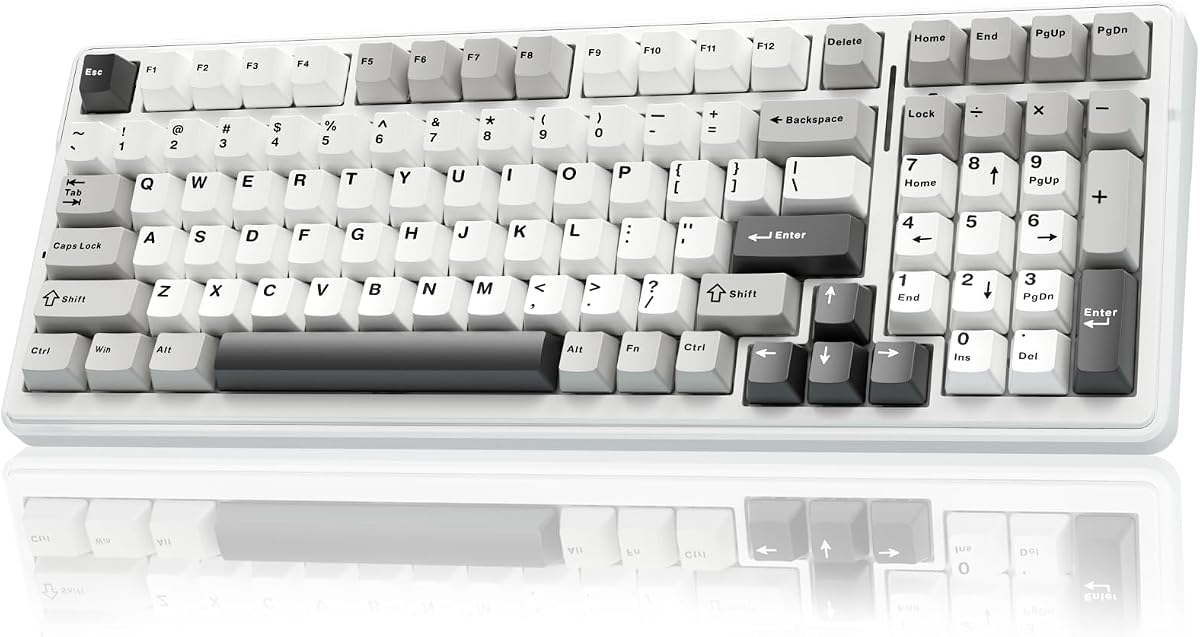


The AULA F75 Pro ranks as our top choice for balancing features and price. It offers robust connectivity options and high-quality switches out of the box.
We may earn a commission when you buy through this link, at no additional cost to you.
Its pre-lubed Reaper switches provide a smooth, creamy feel that enthusiasts will appreciate. The hot-swap base allows easy upgrades without soldering.
While the driver is Windows-only and lacks a display, the knob handles media and lighting efficiently. This trade-off keeps costs down significantly.
Ideal for gamers and typists wanting a compact, versatile wireless keyboard. It delivers professional performance at a competitive entry price.
The Bluetooth 5.0 and 2.4GHz modes ensure stable connections across multiple devices for seamless switching.
The multi-function knob offers intuitive media and backlight control, enhancing workflow efficiency during tasks.
We may earn a commission when you buy through this link, at no additional cost to you.
This model delivers exceptional value with similar core features to the Pro version. It is perfect for those seeking quality without a premium price tag.
We may earn a commission when you buy through this link, at no additional cost to you.
The LEOBOG Reaper switches offer a satisfying typing experience right away. The RGB effects add a customizable aesthetic appeal to your setup.
The main trade-off is fewer premium touches like side-printed keycaps found elsewhere. However, the performance remains consistent and reliable for daily use.
Buy this if you want a reliable entry-level mechanical keyboard. It supports essential gaming and work tasks effectively.
The 75% layout saves desk space while keeping arrow keys and function rows fully intact for productivity.
Integrated sound-dampening layers ensure a solid thocky sound, minimizing unwanted noise during intense typing.
We may earn a commission when you buy through this link, at no additional cost to you.
The F108 PRO stands out with its integrated display screen, offering unique visual information and GIFs. This makes it a standout for high-end setups.
We may earn a commission when you buy through this link, at no additional cost to you.
Its full-size layout includes a dedicated number pad, essential for data entry or specific gaming needs. The massive battery ensures weeks of wireless use.
While expensive and bulky, it offers unmatched utility and customization potential via the screen. It is a luxury choice for power users.
Invest in this if you need a full-size layout and enjoy visual personalization. It combines function and form uniquely.
The color TFT screen allows real-time updates on battery status and customizable GIFs for a dynamic look.
With an 8000mAh cell, you get significantly longer run times compared to smaller models, reducing recharge frequency.
We may earn a commission when you buy through this link, at no additional cost to you.
This keyboard strikes a balance between a full-size board and compact layouts. It keeps the number pad but reduces the overall footprint significantly.
We may earn a commission when you buy through this link, at no additional cost to you.
The 8000mAh battery ensures long-lasting usage, which is rare for mid-range models. Linear switches are ideal for rapid game inputs.
It might feel tight for users with larger hands, but it fits smaller desks well. The battery life is a massive plus.
Select this if you need a number pad but want to save space. It offers excellent endurance for daily tasks.
The 96% layout compresses the numpad closer to the main keys, saving desk space without losing functionality.
The large battery capacity supports weeks of use on a single charge, minimizing downtime and charging interruptions.
We may earn a commission when you buy through this link, at no additional cost to you.
The White and Brown color variant offers a unique aesthetic that stands out on any desk. It retains the core quality of the F75 series.
We may earn a commission when you buy through this link, at no additional cost to you.
Linear switches provide a smooth, consistent travel path ideal for gaming and rapid typing. This reduces fatigue over long sessions.
Users seeking tactile bumps may find it less distinct, but the smoothness is a pro for many. The design is visually appealing.
Choose this for its specific colorway and smooth typing experience. It is reliable for gamers who prefer linear switches.
The unique White and Brown color scheme offers a stylish look that complements modern desktop setups effectively.
Linear switches enable quick repeated key presses, beneficial for fast-paced gaming scenarios requiring rapid input.
We may earn a commission when you buy through this link, at no additional cost to you.
This model emphasizes versatility, supporting up to five devices with easy switching. It works well across PCs, tablets, and gaming consoles.
We may earn a commission when you buy through this link, at no additional cost to you.
The 8000mAh battery ensures it stays powered during marathon sessions. The RGB lighting can be customized to match your console aesthetic.
Users relying on Mac may find driver features limited compared to Windows. However, core functions work universally across platforms.
Pick this if you use multiple devices and need seamless connectivity. It simplifies multi-device workflows effectively.
Compatible with PC, consoles, and mobile devices, allowing seamless transitions between different hardware ecosystems easily.
The ability to switch between five devices instantly boosts productivity by reducing the need to unplug cables.
We may earn a commission when you buy through this link, at no additional cost to you.
The S98 Pro features an LCD screen similar to higher-end models but at a mid-range price. It provides essential system stats at a glance.
We may earn a commission when you buy through this link, at no additional cost to you.
Side lighting adds a cool visual effect to the standard RGB. The 5000mAh battery is decent, though not the largest on this list.
It offers great value for users wanting a screen without the premium cost. The layout is familiar and easy to use.
Select this for a balance of features and price. It adds a modern touch to your desk setup.
The LCD screen displays battery levels and connection status, helping you stay informed without extra software.
Side RGB bars add depth and style, distinguishing this model visually from standard RGB keyboards.
We may earn a commission when you buy through this link, at no additional cost to you.
This F99 variant emphasizes sound quality with a gasket mount and extensive silicone padding. It creates a deep, thocky sound signature.
We may earn a commission when you buy through this link, at no additional cost to you.
The build feels solid and premium despite the reasonable price. The 8000mAh battery ensures longevity for daily tasks.
The heavier weight provides stability but might reduce portability. It is best for users who prioritize sound over travel.
Buy this if sound quality is your main priority. It delivers a professional audio experience.
Gasket mounting allows natural flex, creating a deeper, more resonant sound profile compared to rigid boards.
Silicone padding adds stability, ensuring the board stays firmly in place during intense typing or gaming sessions.
We may earn a commission when you buy through this link, at no additional cost to you.
Featuring Greywood switches, this model offers a premium feel often found in custom keyboards. It appeals to enthusiasts seeking unique typing experiences.
We may earn a commission when you buy through this link, at no additional cost to you.
The Cool Black colorway looks sleek and modern. It maintains the standard F75 features but upgrades the core tactile components.
Users might pay slightly more for these specific switches. However, the difference in smoothness is noticeable and appreciated.
Choose this for superior tactile feedback. It offers a high-quality experience for typing enthusiasts.
Greywood switches are pre-lubed for smoothness, offering a tactile experience comparable to custom mechanical setups.
The Cool Black finish pairs perfectly with dark setups, providing a minimalist and professional look.
We may earn a commission when you buy through this link, at no additional cost to you.
The S75 PRO brings a screen to a compact format, offering high-end features at a competitive price. It is ideal for modern gamers.
We may earn a commission when you buy through this link, at no additional cost to you.
Its 80-key layout saves significant space while keeping essential navigation keys. Side lighting adds a distinctive visual flair.
You lose the number pad, which is a trade-off for portability. But the screen compensates by offering unique utility.
Select this for a stylish, compact experience. It combines screen utility with a small footprint.
The 80-key layout reduces desk clutter while retaining essential keys for gaming and basic productivity tasks.
The integrated screen supports GIFs and system stats, adding a unique layer of personalization to your setup.
We may earn a commission when you buy through this link, at no additional cost to you.
Selecting the right keyboard involves considering layout, connectivity, and specific features like screens or knobs. Use this guide to evaluate your priorities.
Aula offers 75%, 96%, and full-size layouts. Smaller layouts save space and improve ergonomics by keeping keys closer. Larger layouts provide number pads for data entry.
Choose 75% for space saving or full size if you frequently use a number pad. Consider your desk size before buying.
Most models support Bluetooth and 2.4GHz wireless. 2.4GHz offers lower latency for gaming, while Bluetooth suits multi-device productivity. Check device compatibility.
Prioritize 2.4GHz for gaming and Bluetooth for office work. Ensure your devices support the required protocols.
Options include linear, tactile, and clicky switches. Linear switches are smooth and quiet, ideal for rapid inputs. Tactile switches provide feedback for typing accuracy.
Select linear for gaming or tactile for typing. Switches are often hot-swappable for future customization.
Battery life varies from 4000mAh to 8000mAh. Larger batteries last weeks but add weight. Smaller batteries charge quickly but need frequent recharging.
Prioritize 8000mAh if you want long wireless use. Smaller batteries are lighter for portability.
Some models include screens, knobs, or side lighting. These add utility but increase cost. Knobs control volume and brightness easily.
Decide if you need extra controls. Screens offer visual customization but require software setup.
Look for PBT keycaps and gasket mounts. PBT keycaps resist wear and shine. Gasket mounts improve sound and typing comfort.
Choose keyboards with PBT keycaps and solid structures. This ensures durability and better acoustics.
Drivers allow macro programming and lighting control. Some drivers support Windows only. Check OS compatibility before purchasing.
Ensure the keyboard works with your OS. Windows drivers offer advanced features like macros.
Prices vary based on features. Basic models are affordable; premium ones cost more. Determine your budget for essential features.
Set a budget and stick to it. You can find quality models across different price points.
Pair your keyboard via Bluetooth or the 2.4GHz receiver. Use the FN key combination to switch between multiple connected devices easily.
Clean the keys regularly using a soft brush or compressed air. Avoid harsh chemicals that may damage the PBT keycaps or RGB LEDs.
Recharge the battery using the USB-C cable. Keep the battery between 20% and 80% for optimal long-term health.
Yes, all listed models support Mac via Bluetooth or USB. However, some advanced driver features may only work on Windows. Basic typing functions work universally.
Yes, all models feature hot-swappable PCBs. You can replace 3-pin or 5-pin switches easily without soldering. This allows you to customize the tactile feel.
The F99 and F108 PRO models feature an 8000mAh battery, providing the longest wireless usage. This is ideal for users who avoid frequent charging.
Most models support PS5 and Xbox via USB-C or Bluetooth. Ensure you switch to the correct connection mode for console compatibility before gaming.
Basic functions work out of the box. However, macro programming and advanced lighting customization require the official software driver which is Windows only.
Linear switches are generally preferred for gaming due to their smooth travel. They allow for faster repeated inputs without tactile resistance.
Most keyboards reset by holding a specific FN key combination. Check the manual for the exact key sequence to restore factory default settings.
Most models use double-shot PBT keycaps. These are designed to resist wear and fading over time, ensuring long-term durability.
The Aula F75 Pro remains the top overall choice for its balanced features and price. The F108 PRO stands out for those needing a screen and full-size layout.
Prioritize connectivity and switch type based on your specific needs. Whether you choose a 75% or 96% layout, durability is consistent across the range.
Always check current pricing and availability before purchasing. Prices change frequently so confirm details to get the best deal.