
Arduino Uno REV3
4.8Editor score
Reliable ATmega328P core
Full IDE compatibility
14 digital I/O pins
This guide compares the top Arduino Uno Q boards and kits, evaluating hybrid processing power, AI capabilities, connectivity options, and ecosystem compatibilit
The Arduino Uno Q represents a significant leap forward in embedded development by combining powerful AI capabilities with traditional microcontroller reliability. This hybrid board enables developers to run complex Linux-based applications alongside real-time control tasks, making it ideal for advanced robotics, vision systems, and IoT solutions.
We have carefully analyzed ten distinct products including the official boards and comprehensive starter kits to provide a detailed comparison of features and performance. Our evaluation focuses on processing architecture, memory capacity, connectivity options, and the overall value proposition for developers ranging from hobbyists to industry professionals.
Each selection in this guide highlights specific strengths that cater to different project requirements and skill levels within the maker community. Please note that product availability and pricing can fluctuate frequently so we recommend verifying current details before making your final purchasing decision.
4.8Editor score

4.4Editor score
3.7Editor score
The following table provides a side-by-side overview of all ten selected products highlighting their key specifications and primary use cases to help you quickly identify the best fit for your specific development needs.


The Arduino® UNO™ Q 4GB stands out as the premier hybrid development board by seamlessly blending high-performance computing with real-time control capabilities. It holds a strong rating for its ability to run complex Linux applications while maintaining the familiar Arduino ecosystem for hardware interfacing.
We may earn a commission when you buy through this link, at no additional cost to you.
This board features a dual-brain architecture combining the Qualcomm Dragonwing QRB2210 MPU with the STM32U585 MCU allowing it to handle demanding tasks like object recognition and voice processing efficiently. The inclusion of 4 GB of RAM and 32 GB of storage ensures that developers can run multiple high-level processes and containerized AI models without performance bottlenecks.
While the power is impressive, the complexity of managing two distinct processing cores and a Linux operating system can present a learning curve for beginners. Additionally the cost is significantly higher than traditional microcontroller boards which might be a barrier for small hobby projects.
This platform is ideally suited for professional developers and advanced makers working on sophisticated robotics or IoT systems that require both edge AI and precise hardware control. Its unified development experience makes it the top choice for those ready to upgrade beyond standard Arduino limitations.
The combination of a quad-core ARM processor for high-level tasks and a real-time microcontroller for low-level control ensures that your projects run smoothly without compromising on speed or precision.
Running Linux Debian allows you to use Python and other modern scripting languages alongside traditional Arduino Sketches giving you maximum flexibility in how you design and deploy your applications.
We may earn a commission when you buy through this link, at no additional cost to you.
This kit bundles the powerful Arduino UNO Q 4GB AI Board with a dedicated 45W USB-C power supply ensuring that your system has the stable energy required for heavy workloads. It is rated highly for engineers who need a reliable setup for industrial IoT and robotics systems.
We may earn a commission when you buy through this link, at no additional cost to you.
The board itself features the same advanced hybrid processing power as the standard version but the included power supply guarantees consistent operation even when driving multiple peripherals or running intensive AI models. This makes it an excellent choice for deployments where power fluctuations could disrupt sensitive operations.
The main trade-off is the added cost and the physical bulk of the power adapter which might be less convenient for portable projects. However for stationary installations or prototyping environments this reliability is often worth the investment.
Choose this option if you are building scalable systems where power stability is critical. It removes the guesswork from power requirements allowing you to focus entirely on coding and hardware integration without worrying about supply constraints.
The included 45W USB-C supply ensures that the board receives consistent power during high-load tasks preventing unexpected shutdowns that can occur with standard adapters.
Designed for scalability this bundle supports the rigorous demands of professional environments making it a strong candidate for prototyping before full-scale manufacturing deployment.
We may earn a commission when you buy through this link, at no additional cost to you.
The Arduino Uno REV3 remains the gold standard for entry-level electronics and prototyping projects due to its proven reliability and vast ecosystem support. It boasts an impressive rating for its simplicity and effectiveness in educational and hobbyist contexts.
We may earn a commission when you buy through this link, at no additional cost to you.
Powered by the ATmega328P microcontroller this board offers ample resources for a wide range of projects from simple LED controls to complex robotics. Its full compatibility with the Arduino IDE ensures that you can access a massive library of code and tutorials instantly.
While it lacks the advanced features of newer boards like Wi-Fi or Linux support its simplicity is actually a strength for learning the fundamentals of embedded systems. It does not have the processing power for heavy AI tasks but it excels at real-time control.
This is the perfect choice for beginners or projects that do not require internet connectivity or complex data processing. It provides a solid foundation for learning the basics of microcontroller programming without overwhelming you with unnecessary features.
With decades of community contributions the Uno REV3 offers the largest collection of tutorials libraries and examples making it the easiest board to learn on and troubleshoot.
The straightforward architecture allows you to focus on understanding circuits and code logic rather than managing complex operating systems or network configurations.
We may earn a commission when you buy through this link, at no additional cost to you.
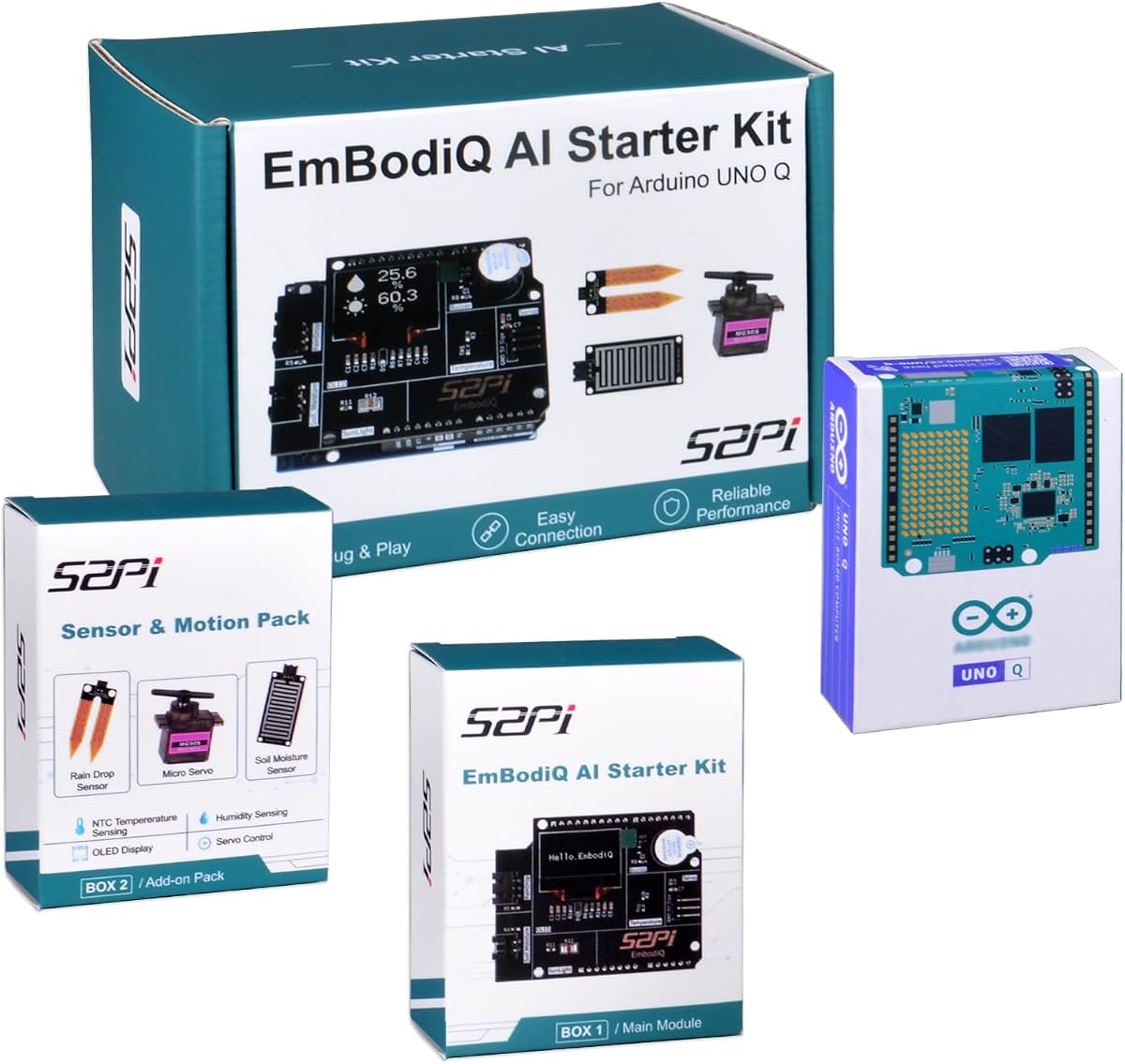
The GeeekPi EmbodiQ AI Starter Kit offers a unique approach to development by allowing you to control hardware using natural language commands instead of complex code. It is designed for those who want to experiment with AI agents without deep programming expertise.
We may earn a commission when you buy through this link, at no additional cost to you.
This kit includes a specialized AI Agent HAT that enables real-time reasoning and multi-step task execution. The included sensors such as soil moisture and raindrop detectors make it perfect for smart gardening or weather station projects immediately out of the box.
One limitation is that it relies on external AI providers which may introduce latency or require an internet connection. The rating reflects some variability in setup complexity but the convenience of voice control remains a standout feature.
Choose this kit if you want to explore the intersection of AI and physical computing with minimal coding effort. It is an excellent tool for educators and hobbyists interested in voice-activated home automation or environmental monitoring.
The natural language interface allows you to simply tell your hardware what to do making advanced automation accessible to users with limited coding experience.
Included sensors and mounts provide a complete package for specific use cases like smart gardening ensuring you have everything needed to start prototyping immediately.
We may earn a commission when you buy through this link, at no additional cost to you.
The Arduino UNO R4 WiFi bridges the gap between simple microcontrollers and advanced boards by adding robust wireless connectivity without sacrificing ease of use. It is highly rated for its balance of performance and practicality for IoT applications.
We may earn a commission when you buy through this link, at no additional cost to you.
Features like the 12-bit DAC and integrated OP-AMP allow for high-precision analog output which is rare on standard boards. The built-in LED matrix provides instant visual feedback making it excellent for interactive displays or status indicators.
While it does not run a full Linux OS it offers a significant step up in connectivity with Wi-Fi and Bluetooth built directly into the core architecture. The CAN bus support also opens up industrial and automotive application possibilities.
This board is ideal for projects that require reliable wireless communication but not the complexity of a full computer. It offers a modern feature set at a reasonable price point that fits most intermediate to advanced user needs.
The high-precision DAC and operational amplifier enable projects requiring smooth audio signals or precise voltage control that standard digital outputs cannot provide.
The onboard LED matrix allows for immediate visual interaction without needing external displays making it perfect for user interfaces and status monitoring.
We may earn a commission when you buy through this link, at no additional cost to you.
This basic UNO R3 board provides the essential components needed to start learning electronics without any extra cost for accessories. It is a straightforward option for those who already have other parts or just want a simple controller.
We may earn a commission when you buy through this link, at no additional cost to you.
The board maintains full compatibility with the standard Arduino IDE and offers the classic I/O options that beginners rely on. It includes a USB cable to ensure you can program it immediately upon arrival.
It lacks the advanced features of the R4 or Q series but it is perfectly adequate for many standard projects. The rating reflects its functionality as a basic tool rather than a feature-rich development platform.
Use this option if you are stocking up on boards for a classroom or a project that does not require wireless connectivity. It is a reliable workhorse for fundamental prototyping and education.
Standard UART SPI and I2C interfaces ensure that you can connect a wide variety of sensors and displays without needing specialized adapters.
The proven design ensures compatibility with thousands of existing tutorials and libraries making it a safe choice for learning and prototyping.
We may earn a commission when you buy through this link, at no additional cost to you.
This comprehensive starter kit provides everything you need to run the Arduino UNO Q as a full single-board computer including a durable case and all necessary cables. It is highly rated for its completeness and protection for the board.
We may earn a commission when you buy through this link, at no additional cost to you.
The included USB-C hub with an Ethernet port significantly expands the connectivity options which is crucial for industrial or home server applications. The aluminum case ensures heat dissipation and physical protection for the sensitive components.
The main trade-off is that this version comes with 2 GB of RAM which may be limiting for very heavy AI tasks compared to the 4 GB models. However for general development and embedded tasks it provides a robust foundation.
Choose this kit if you want a professional setup out of the box without buying components separately. It is ideal for developers who need a reliable and protected system for ongoing projects.
The sturdy aluminum case not only protects the board from dust and impacts but also ensures efficient heat dissipation for stable long-term operation.
The included USB-C hub with Ethernet allows for stable network connections essential for IoT devices that require reliable internet access.
We may earn a commission when you buy through this link, at no additional cost to you.
The ELEGOO UNO R3 Super Starter Kit is designed to teach the fundamentals of electronics through a series of guided lessons and comprehensive component selection. It is widely rated as one of the best options for absolute beginners and education.
We may earn a commission when you buy through this link, at no additional cost to you.
The kit includes a wide variety of components such as sensors motors and displays ensuring that you have everything needed for many different types of projects. The included tutorial PDF simplifies the learning process significantly.
While the controller is a basic UNO R3 the value comes from the sheer number of parts included which would cost more if bought individually. It is perfect for learning but may not suit complex custom projects.
This is the ideal choice for students or hobbyists who want a structured introduction to the Arduino platform. It provides a risk-free environment to learn coding and circuit basics.
With over 22 guided lessons you can progress from simple LED blinking to complex projects with clear instructions for each step.
The variety of sensors and motors ensures that you can build a wide range of projects without needing to buy additional parts immediately.
We may earn a commission when you buy through this link, at no additional cost to you.
This ELEGOO UNO R3 board provides a reliable and affordable alternative to the official version with excellent compatibility and clear labeling. It is a popular choice for those needing a dependable board without the higher cost.
We may earn a commission when you buy through this link, at no additional cost to you.
The inclusion of the ATmega16U2 USB interface ensures reliable sketch uploads and serial communication which can sometimes be an issue on cheaper clones. The headers are clearly labeled making wiring easier for beginners.
While it lacks the extra features of newer boards it serves its purpose well as a standard controller for a wide range of projects. The USB cable included adds to the immediate usability of the board.
Choose this board if you need a dependable controller for prototyping or a class setting. It offers a balance of cost and performance that fits many budget-conscious projects.
The ATmega16U2 interface ensures that your connection to the computer is stable during programming which prevents errors during sketch uploads.
Clearly labeled headers simplify the process of connecting wires and modules reducing the time spent troubleshooting wiring issues.
We may earn a commission when you buy through this link, at no additional cost to you.
This UNO R3 board offers a highly compatible entry-level option for electronics projects with standard features that support a wide range of applications. It is recognized for its broad compatibility with various shields and modules.
We may earn a commission when you buy through this link, at no additional cost to you.
The board supports PWM on digital pins allowing for precise control of motors and LEDs which is essential for many robotics and lighting projects. Its design ensures it can work seamlessly with many existing ecosystems.
It is a basic board without extra features but that simplicity makes it easy to integrate into larger systems. It is a practical choice for hobbyists who need a reliable controller without extra bulk.
Use this board if you are building projects that rely on standard shields and sensors. It provides a solid foundation for learning and prototyping at an accessible price point.
PWM support on digital pins allows you to control the speed of motors and brightness of lights with high precision.
The standard layout ensures that you can connect a wide variety of shields and modules without needing custom adapters.
We may earn a commission when you buy through this link, at no additional cost to you.
Selecting the right Arduino Uno Q or alternative depends on your specific project requirements and technical expertise. This guide outlines the critical factors to consider before making your decision.
The Arduino Uno Q features a hybrid architecture combining a high-performance MPU for Linux tasks and an MCU for real-time control. This is ideal for projects requiring complex data processing alongside precise hardware timing. Traditional boards like the Uno R3 rely on a single MCU which simplifies development but limits computational power.
Evaluate whether you need Linux capabilities or if a standard microcontroller will suffice for your application.
Advanced applications often require significant RAM and storage to run models and store data. The Q series offers up to 4 GB RAM and 32 GB storage which supports heavy workloads. Basic boards typically have only 2 KB of SRAM and limited flash which restricts the complexity of programs you can run.
Ensure your selected board has enough resources to handle your intended software without performance issues.
Wireless communication is essential for many modern IoT projects. The UNO R4 WiFi includes built-in Wi-Fi and Bluetooth while the Q series also offers these features. Traditional UNO R3 boards usually require add-on modules for wireless connectivity which adds complexity and cost.
Choose a board with built-in connectivity if you plan to deploy devices in remote or wireless environments.
The Arduino Uno Q maintains the classic UNO form factor allowing you to use existing shields easily. This compatibility ensures that you can leverage your existing hardware investments without redesigning your project. Other advanced boards might use different layouts that require adapters.
Check that the board you choose supports the shields and connectors you already own or plan to use.
High-performance boards often require more stable and higher power supplies to operate reliably. The UNO Q supports USB-C which can deliver sufficient power for most setups. Ensure you have a compatible power source if you plan to run the board continuously.
Consider the power delivery options of the board to ensure it matches your project's energy needs.
The Arduino ecosystem provides extensive libraries and tutorials that simplify development. Boards like the Uno R3 have the largest community support making troubleshooting easier. Newer boards like the Q series are catching up but may have fewer resources available initially.
Prioritize boards with strong community support if you are working on a project with tight deadlines.
The price of these boards varies significantly based on features and included accessories. Starter kits often provide better value by including necessary components. However standalone boards may be more economical if you already have the required tools.
Balance your budget against the features you need to ensure you are not overspending for unused capabilities.
Different boards excel in different domains such as robotics home automation or AI. The UNO Q is tailored for AI and complex processing while the R3 is better for simple control tasks. Select a board that aligns with the primary function of your project.
Match the board's strengths to your project goals to achieve the best results with minimal overhead.
To get started with your board download the latest Arduino IDE and connect the board via USB. Select the correct board model in the software and upload a basic sketch to verify functionality. Ensure you have the necessary drivers installed for your operating system.
When using the Q series consider using the Python environment for complex tasks while retaining Arduino Sketches for hardware control. This hybrid approach leverages the full potential of the dual-core architecture. Utilize the included documentation for setup guidance.
For long-term care store your board in a dry and cool environment to prevent damage. Avoid bending the pins excessively when connecting modules and use a quality power supply to prevent electrical stress. Proper maintenance ensures the longevity of your investment.
Yes the Uno Q is designed to run standard Arduino sketches seamlessly while also supporting Linux-based applications. This allows you to use existing libraries and code with minimal modification for advanced features.
No the board can operate entirely offline for local tasks. However certain AI features may benefit from internet connectivity to utilize cloud-based models effectively.
Yes it maintains the classic UNO form factor ensuring compatibility with most existing shields and accessories. This makes it easy to transition from older boards without needing new hardware.
The board runs Linux Debian which supports a wide range of modern software and tools. It allows you to use Python and other scripting languages alongside traditional Arduino environments.
The Uno Q offers a hybrid architecture with a full Linux OS while the R4 WiFi is optimized for connectivity and analog tasks. The Q is better for complex AI and the R4 for simpler IoT projects.
It is recommended to use a high-quality USB-C power supply to ensure stable operation under load. Standard adapters may not provide enough power for all integrated features.
Beginners can use the Uno Q but it has a steeper learning curve due to its advanced features. The community and documentation provide ample resources to help new users get started.
The Qualcomm processor in the Uno Q runs at a high frequency allowing for fast processing of complex tasks. This is significantly faster than the standard microcontroller speeds found in classic boards.
The Arduino Uno Q and its related kits represent the cutting edge of embedded development combining high-performance computing with hardware control. Our top picks highlight the best balance of features and value for different needs.
Prioritize boards with the features you actually need to avoid unnecessary complexity. The Q series excels for AI and Linux tasks while the R3 remains the king of simplicity and value for basic projects.
Prices and availability for these boards fluctuate frequently so verify current details before purchasing. Choosing the right board now will save you time and effort in the long run.