
Thames & Kosmos My Robotic Pet
4.1Editor score
Screen-free coding cards
Color-sensing robot
Educational guide included
Discover the top coding toys for kids in October 2026. This guide compares screen-free and app-based robotic kits to help your child learn programming skills
Coding toys offer a playful way for children to grasp programming concepts without staring at screens all day. These interactive kits encourage logical thinking, problem solving, and creativity through hands-on building and movement.
We evaluated ten leading models based on educational value, ease of use, durability, and engagement factors. Each product was analyzed for its ability to teach sequencing, loops, and core robotics principles across various age groups.
Our list highlights top picks for different budgets and learning styles while noting key features like battery needs and assembly time. Prices and availability may change so verify details before purchasing your chosen educational robot kit.
4.1Editor score

4.6Editor score

4.6Editor score
The following table provides a quick side-by-side look at key specifications and features for each of the ten selected coding toys. This overview helps you identify which model matches your child's age and learning goals.





The Thames & Kosmos My Robotic Pet is an affordable entry point for children interested in robotics and coding. With a rating of 4.1 stars it stands out for its screen-free design that encourages physical interaction over digital screens.
We may earn a commission when you buy through this link, at no additional cost to you.
This kit allows kids to construct a 15-inch robotic chameleon that responds to gestures and color changes. The use of physical action cards for programming teaches sequencing without needing tablets or computers which is great for focused learning.
While the build process requires adult assistance for younger users the comprehensive manual ensures meaningful engagement. The trade-off is less app-based flexibility but the tangible nature of the coding cards makes abstract concepts easier to grasp.
This toy is ideal for families seeking an educational gift that minimizes screen time. Its award-winning status and clear instructions make it a reliable choice for introducing engineering principles to kids aged eight and older.
Programming via physical cards helps children focus on logic without digital distractions.
The assembly process teaches mechanical joints and movement simulation effectively.
We may earn a commission when you buy through this link, at no additional cost to you.
The Makeblock mBot is a robust robotics kit designed for ages eight to twelve. Its high rating of 4.6 stars reflects its success in combining hardware building with progressive software learning from Scratch to Arduino.
We may earn a commission when you buy through this link, at no additional cost to you.
Kids can assemble this metal-framed robot in about fifteen minutes and then customize its functions through coding cards or apps. The open-source nature allows expansion with hundreds of modules making it a long-term investment for young engineers.
Although batteries are not included and setup requires some attention the educational payoff is significant. The ability to move from simple remote control to complex programming ensures the toy grows with the child's skills.
This is a top choice for school projects or serious hobbyists wanting real engineering experience. Its compatibility with LEGO parts and rich tutorial support make it accessible yet powerful enough for advanced coding tasks.
Starts with visual coding and transitions to text-based languages seamlessly.
Add-on packs allow for endless configuration and creative challenges.
We may earn a commission when you buy through this link, at no additional cost to you.
Sphero Mini packs a lot of educational value into a tiny ball sized like a ping pong ball. With a 4.6 rating it earns its spot as Editor's Choice by blending fun gaming with serious coding practice for kids and teens.
We may earn a commission when you buy through this link, at no additional cost to you.
Users can drive it manually through tilt or joystick modes or code it using the free Sphero Edu app. The ability to draw paths or write JavaScript allows for flexibility that suits both beginners and more advanced learners.
While it requires a smartphone or tablet to function this connectivity enables rich interactive lessons. The included cones and pins set up immediate obstacle courses though battery life limits sessions to about an hour.
This robot is perfect for on-the-go learning or small spaces where larger bots won't fit. Its engaging design and robust app support make it a standout tool for teaching algorithmic thinking and control.
Arcade-style games turn coding practice into an exciting challenge.
From drag-and-drop blocks to JavaScript supports various skill levels.
We may earn a commission when you buy through this link, at no additional cost to you.
The Learning Resources Code & Go Robot Mouse is designed specifically for young learners as young as four. Its 4.5 rating highlights its success in introducing sequencing and problem solving without any digital distractions.
We may earn a commission when you buy through this link, at no additional cost to you.
Children press buttons on the mouse to program its path across a grid using physical coding cards. This tactile approach builds confidence through trial and error while teaching fundamental logic and directional concepts effectively.
While the mechanics are simple compared to advanced bots they are perfect for early development. The main limitation is that it relies on a fixed grid system which might eventually feel restrictive to older kids.
This set is ideal for home or classroom STEM centers focusing on foundational skills. The included maze walls and tunnels encourage creativity while keeping the focus strictly on coding logic and planning.
Physical buttons help toddlers visualize cause and effect relationships clearly.
Building custom paths teaches spatial awareness and planning skills.
We may earn a commission when you buy through this link, at no additional cost to you.
TEACH TECH Mech-5 is designed for older children who enjoy deep mechanical challenges. With a 4.5 rating it offers a unique take on coding by focusing on mechanical engineering principles alongside basic programming logic.
We may earn a commission when you buy through this link, at no additional cost to you.
This is not a pre-assembled toy; it requires multiple hours of assembly to create a robot that can throw, kick, or draw. The process teaches patience and precision while the coding wheel system controls complex actions.
The trade-off is significant time investment which may not suit kids looking for instant gratification. However for those interested in how things work internally this provides a more authentic engineering experience than typical toys.
This kit is best for future engineers aged ten and older who want real build satisfaction. The mission-based approach ensures every step has a purpose making the long build time feel like a genuine educational journey.
Assembly reveals gears and motors helping kids understand robotics internals.
Physical buttons snap onto a wheel for intuitive action sequencing.
We may earn a commission when you buy through this link, at no additional cost to you.
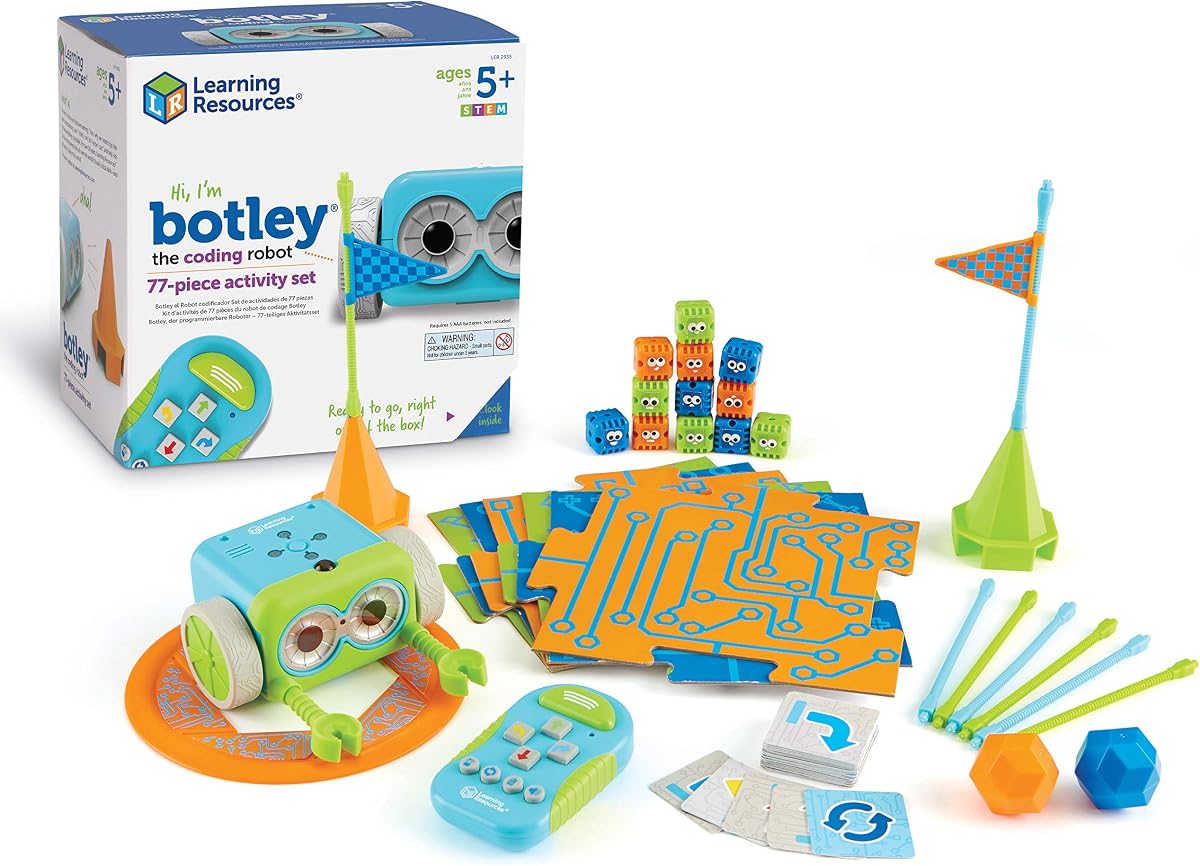
Botley is a trusted name in educational robotics offering a complete screen-free kit for ages five and up. Its high 4.6 rating confirms its reliability and ability to teach coding logic without needing any electronic devices.
We may earn a commission when you buy through this link, at no additional cost to you.
Kids use a remote programmer to send commands directly to Botley which can detect objects and avoid them. The set includes 77 pieces allowing for obstacle courses and creative challenges that expand as skills grow.
While the programming logic is simpler than app-based bots the hands-on nature keeps focus sharp. The main downside is reliance on batteries which drain quickly with heavy play sessions but the fun is worth it.
This set is perfect for introducing basic loops and sequencing in a tactile way. Its ability to follow lines and unlock hidden features keeps younger children engaged while building a foundation for more complex coding.
Botley senses objects in front of it to teach safety and navigation.
Secret codes unlock new modes adding replay value to the toy.
We may earn a commission when you buy through this link, at no additional cost to you.
The Ozobot Evo Coding Robot Kit offers a unique blend of screen-free and digital learning options. With a 4.6 rating it stands out for its comprehensive resources and ability to adapt to different learning styles effectively.
We may earn a commission when you buy through this link, at no additional cost to you.
Kids can draw paths with color-coded markers to direct the robot or use the Ozobot Blockly app for coding. This dual approach ensures it serves both tactile learners and those ready for digital interfaces without switching devices often.
The main consideration is the higher price point compared to simpler toys but the educational value is substantial. Over 700 free lessons cover STEAM subjects making it a robust tool for both home and classroom environments.
This kit is ideal for educators or parents wanting a long-term learning investment. Its durability and organized storage case make it practical for daily use while the skill levels grow with the child's abilities.
Lines drawn with markers control speed and direction uniquely.
Free lessons align with school standards for easy integration.
We may earn a commission when you buy through this link, at no additional cost to you.
Botley 2.0 builds on the classic formula with enhanced navigation features like 45-degree turns and object sensing. Its 4.5 rating reflects solid improvements that make coding challenges more varied and engaging for young learners.
We may earn a commission when you buy through this link, at no additional cost to you.
The remote programmer allows kids to design complex command sequences without needing a screen. With 78 pieces including stackable obstacles this set supports creative story building and maze design that evolves as skills improve.
While it requires batteries and some setup time the open-ended play ensures lasting interest. The main limitation is that it still lacks advanced programming features found in higher-end digital bots but it excels at logic basics.
This is a strong choice for classrooms or home libraries needing reliable screen-free tools. The addition of secret codes and sound effects adds fun to the logical structure keeping children motivated throughout learning sessions.
45-degree turns allow for sharper angles and better maze navigation.
Stackable pieces let kids invent new games beyond standard activities.
We may earn a commission when you buy through this link, at no additional cost to you.
The Wonder Workshop Dash Robot is a premium option that is ready to use right out of the box. With a 4.6 rating it stands out for its no-assembly requirement and rich ecosystem of apps that support deep coding lessons.
We may earn a commission when you buy through this link, at no additional cost to you.
Dash can sing, dance, and respond to voice commands which keeps engagement high for kids six and older. The five different apps cover everything from path drawing to advanced variables providing a complete learning curve.
The main drawback is the higher price point which requires a larger budget. However for families wanting a polished robot that works seamlessly with tablets the investment delivers long-lasting educational value and fun.
This robot is ideal for tech-savvy households looking for interactive play. Its widespread adoption in schools globally confirms its reliability and ability to teach complex STEM concepts through intuitive gameplay.
Voice commands make the robot feel like a real friend to kids.
Different apps offer distinct coding challenges to prevent boredom.
We may earn a commission when you buy through this link, at no additional cost to you.
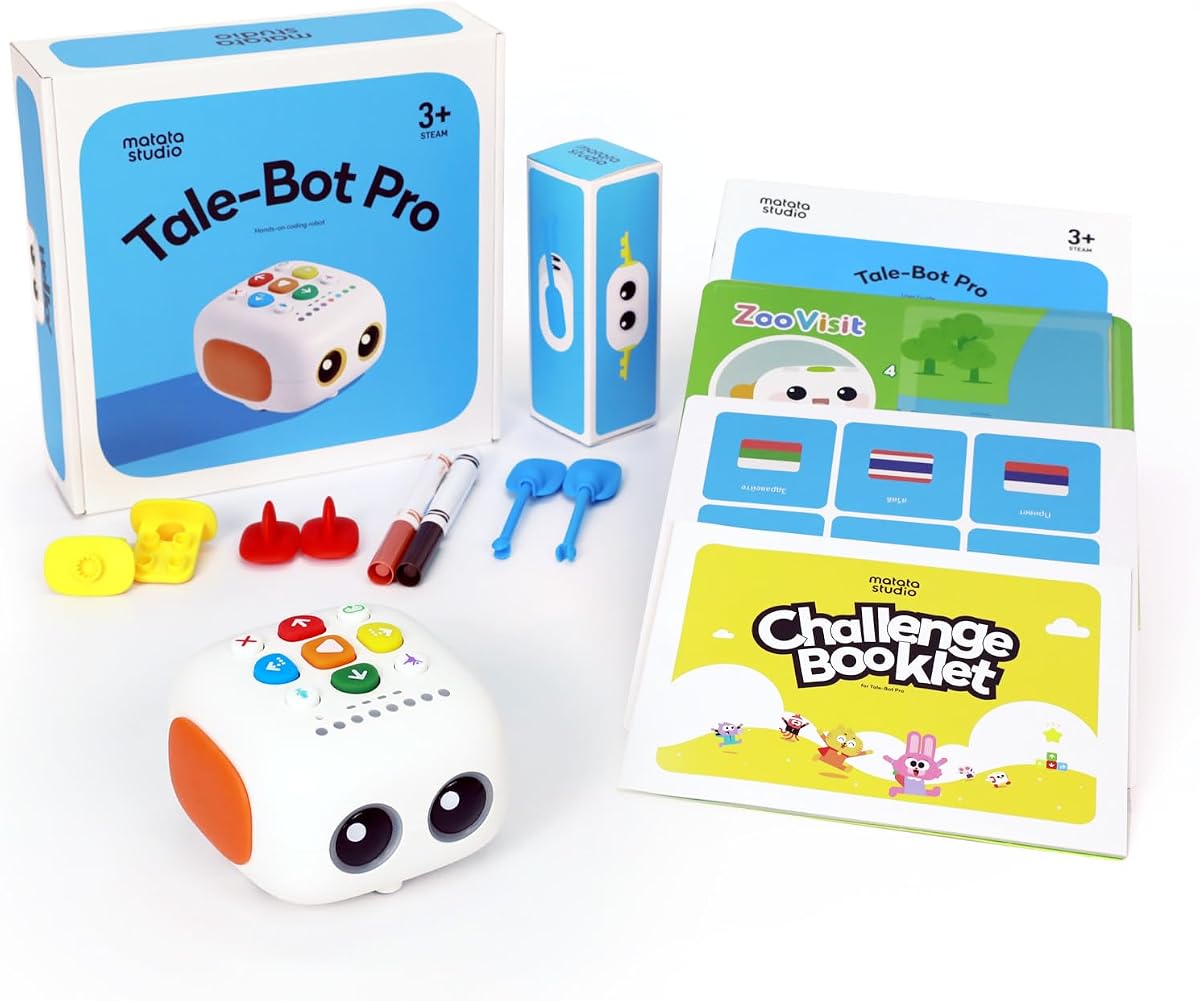
TaleBot Pro is tailored specifically for toddlers aged three to five focusing on storytelling alongside coding basics. Its 4.7 rating highlights its success in blending fun interactive play with early logic development for younger kids.
We may earn a commission when you buy through this link, at no additional cost to you.
Children use physical buttons to make the robot walk, draw, and speak while recording their own voice commands. This storytelling capability helps develop language skills while introducing concepts like loops and sequences in a simple way.
While the logic is simplified for little hands it covers essential coding fundamentals effectively. The main trade-off is that older children may find it too basic quickly but it is perfect for the target age group.
This is a top recommendation for preschoolers or special needs children needing gentle learning tools. Its multilingual support and compatibility with LEGO blocks expand play possibilities ensuring it grows with early development stages.
Recording voice commands helps children express creativity alongside logic.
Simple buttons teach cause and effect without overwhelming screens.
We may earn a commission when you buy through this link, at no additional cost to you.
Selecting the right coding toy requires balancing age appropriateness, educational depth, and budget. This guide breaks down the most important factors to consider before buying a new robotic kit for your child.
Different kits are designed for specific developmental stages. Younger children benefit from screen-free buttons and simple sequences while older kids handle complex app-based programming and mechanical assembly.
Always check the manufacturer's age recommendation to ensure the toy matches your child's motor skills and logical understanding.
Screen-free options minimize digital distractions by using physical cards or buttons for programming. App-based robots offer more features but require a tablet or phone which can lead to longer screen time.
Choose screen-free if you want to reduce screen time and select app-based if you want access to a wider variety of coding languages and challenges.
Some robots arrive pre-assembled while others require significant building time. Building kits teach engineering basics but need patience and adult supervision for younger users.
Consider your child's patience level and your availability to help with setup before committing to a build-heavy kit.
Look for toys that teach core concepts like loops, variables, and conditionals rather than simple movement. Kits that grow in difficulty allow the child to continue learning as their skills improve.
Robots that offer advanced lessons or modular add-ons provide better long-term educational value.
Coding robots are often used in active play so durable materials matter. Metal frames typically withstand more rough handling than plastic casings which might break easily.
Invest in well-built kits if you plan to share the toy among siblings or use it in a classroom setting.
Most robots rely on batteries which can add to the total cost. Rechargeable options save money over time but standard batteries are often more convenient for quick play.
Check if batteries are included in the package to avoid surprise costs after purchase.
Robots with active communities offer extra lessons and project ideas online. Access to free tutorials or school resources can enhance the learning experience significantly.
Choose brands that provide online support to keep the toy engaging after the initial play.
Coding toys range from affordable starter kits to premium educational investments. Higher prices often reflect better materials or more advanced software ecosystems.
Prioritize value over low cost by considering how long the toy will remain engaging for your child.
Start by reading the manual fully to understand the specific controls and programming logic of your robot. Most kits include a quick-start guide to help you set up the first obstacle course or mission.
Store batteries and accessories in a dedicated container to prevent loss. If the toy uses markers or cards keep them organized so you do not lose critical coding tools over time.
Clean sensors and moving parts with a soft dry cloth regularly. Avoid exposing electronics to water or dust which can cause malfunctions during critical play sessions.
Yes, coding toys teach logical thinking, sequencing, and problem solving in a playful way. They help children understand how computers execute instructions without needing complex screen time.
Not all coding toys require a computer. Many use physical cards or buttons to program actions which makes them accessible without needing a tablet or desktop device.
Battery life varies by model but typically ranges from one to four hours of continuous use. Using rechargeable batteries can extend play time and save money in the long run.
It depends on the complexity of the robot. Simple models like Botley work for preschoolers but advanced kits may be frustrating without adult guidance or specific cognitive skills.
Children as young as three can begin with simple sequencing toys. By age five or six they are ready for more structured logic concepts using dedicated educational coding kits.
Yes, many of these toys are designed for classroom use with lesson plans and group activities. They help teachers integrate STEM learning into daily lessons effectively.
We have reviewed ten top options ranging from budget-friendly kits to premium interactive robots. Each choice offers unique strengths depending on whether you prefer screen-free logic or app-based challenges.
Prioritize a model that grows with your child's skills rather than one they will outgrow quickly. Educational value often outweighs pure entertainment features in the long run for development.
Remember to verify current prices and availability before buying since these can change. Check if batteries are included to avoid extra costs upon receipt of your new coding kit.