
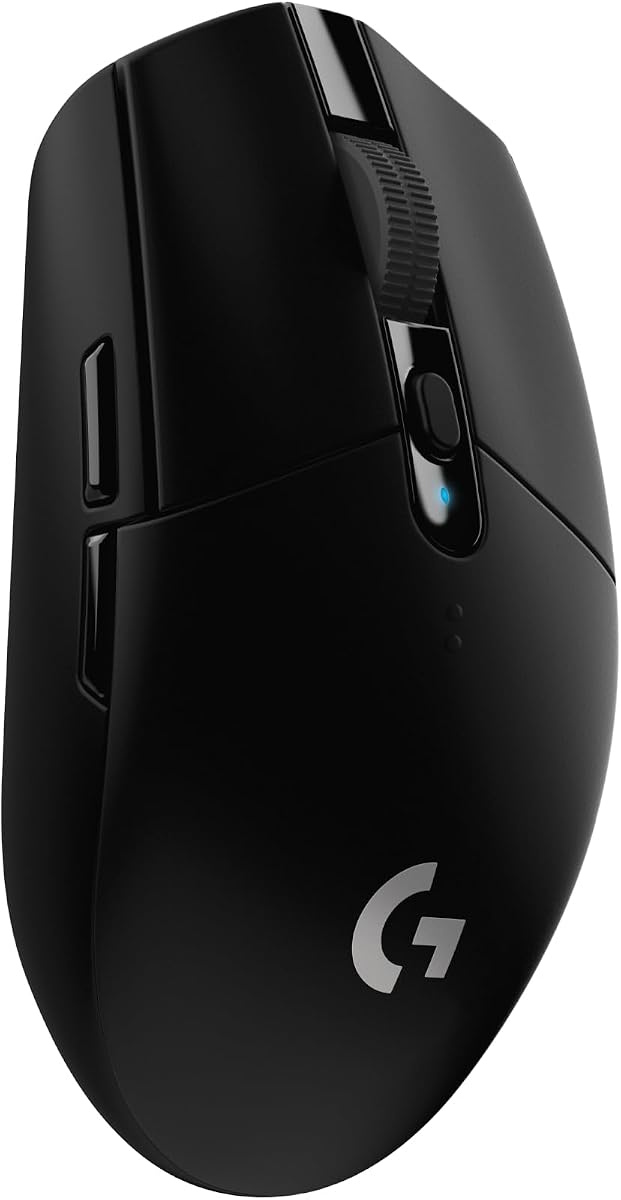
Logitech G PRO X Superlight 2 Wireless Gaming Mouse – Black
4.5Editor score
HERO 2 sensor with 44K DPI
60g lightweight wireless build
95-hour battery life
This guide compares the top gaming mouse for CS2 options for 2026, evaluating sensors, weight, wireless tech, and ergonomics to help you find the perfect
Finding the right gaming mouse for CS2 is critical for competitive success. The right tool enhances precision, reduces fatigue, and ensures your aim translates directly to in-game performance without lag or drift.
We analyzed the latest models based on sensor accuracy, wireless reliability, build quality, and ergonomic design. Our selection prioritizes devices that meet the high demands of tactical shooters and fast-paced arena games.
Each pick highlights unique strengths tailored to different playstyles and budgets. Prices and availability change frequently, so verify current details before purchasing to ensure you get the best value for your setup.
4.5Editor score

4.6Editor score
4.6Editor score
The following table provides a side-by-side comparison of all ten selected gaming mice for CS2, highlighting key specifications and features to help you distinguish between performance tiers.


This mouse stands out as a top-tier option for serious Counter-Strike 2 players. It holds an impressive 4.6 rating due to its focus on speed and precision.
We may earn a commission when you buy through this link, at no additional cost to you.
Its Focus Pro 35K sensor and 8000Hz polling rate ensure that every movement is tracked instantly without any latency. The ultra-lightweight design helps you execute rapid flicks with minimal wrist strain.
The trade-off is the price and a shorter battery life compared to some rivals. However, competitive gamers often prioritize performance over endurance during long tournament sessions.
If you aim to maximize your competitive potential with the latest tech, this is the top recommendation for your setup today.
The 54g weight reduces muscle fatigue during long sessions, allowing for consistent precision throughout the day.
An 8000Hz rate reports position eight times faster than standard mice, ensuring no delay between physical movement and in-game action.
We may earn a commission when you buy through this link, at no additional cost to you.
This model continues the legacy of being a favorite among esports professionals for its refined wireless experience. It maintains a strong 4.5 rating across user reviews for its reliability.
We may earn a commission when you buy through this link, at no additional cost to you.
The HERO 2 sensor delivers unmatched tracking precision with zero smoothing or acceleration. Its zero-additive PTFE feet ensure a smooth glide that matches the high demands of competitive gaming.
While the lack of RGB lighting might bother some, performance enthusiasts often prefer the minimalist approach for focus. The cost is high but justified by the pro-level build quality.
Choose this if you want a trusted, championship-winning wireless mouse that delivers consistent results in critical moments.
The HERO 2 sensor tracks over 888 IPS with up to 44,000 DPI, providing absolute precision without filtering.
LIGHTFORCE switches combine the best of optical and mechanical designs for precise, reliable clicks every time.
We may earn a commission when you buy through this link, at no additional cost to you.
This entry proves you do not need to spend a fortune for high-performance wireless gaming. It enjoys a popular 4.6 rating because it delivers consistent results at a low cost.
We may earn a commission when you buy through this link, at no additional cost to you.
Powered by the HERO sensor and LIGHTSPEED technology, it offers lag-free tracking that rivals more expensive options. The battery life is exceptional, lasting months on a single AA battery.
It is slightly heavier than the latest ultra-light models, which might be a consideration for players who prefer featherlight gear. However, the performance value is hard to beat.
It is the perfect choice for beginners or anyone seeking a reliable wireless mouse without breaking the budget.
You can enjoy up to 250 hours of continuous gameplay on one battery, ensuring you rarely need to swap power.
The nano receiver storage makes it ideal for travel, allowing you to play anywhere with consistent wireless performance.
We may earn a commission when you buy through this link, at no additional cost to you.
This device brings the iconic AWP Dragon Lore skin to life in hardware form, making it a special choice for CS2 fans. It holds a rare 5.0 rating from users who appreciate the unique style and performance.
We may earn a commission when you buy through this link, at no additional cost to you.
The TrueMove Air sensor provides pixel-perfect tracking for accurate aiming. Its quantum wireless technology ensures lag-free performance, while the 200-hour battery life supports extended play.
The design is specific to Dragon Lore fans, which might not appeal to everyone. Additionally, availability can be limited due to its edition status.
If you love the AWP Dragon Lore skin and want a wireless mouse that matches it perfectly, this is your ideal pick.
This limited edition mouse features a design inspired by one of the rarest skins in gaming history.
The up to 200-hour battery life ensures you can play for weeks without needing to recharge frequently.
We may earn a commission when you buy through this link, at no additional cost to you.
This wireless gaming mouse shares the Dragon Lore aesthetic but offers solid performance features for daily play. User ratings are more varied, indicating some trade-offs compared to other options.
We may earn a commission when you buy through this link, at no additional cost to you.
The TrueMove Air sensor ensures reliable tracking for precise shots. It offers a 2.4GHz wireless connection and a long battery life that supports long sessions.
Some users may find the pricing higher than expected given the mixed reception. It is a niche pick for those who value the specific design and connectivity.
Consider this if the Dragon Lore look is a top priority and you need a wireless device with reliable battery life.
You can switch between 2.4GHz for gaming and Bluetooth for other devices easily with Quantum 2.0 wireless.
With 80 million clicks guaranteed, this mouse is built to withstand heavy usage over many gaming sessions.
We may earn a commission when you buy through this link, at no additional cost to you.
The Keychron G3 is an impressive choice for those seeking the lightest feel on the market. It earns a strong 4.7 rating for its carbon fiber build and competitive performance specs.
We may earn a commission when you buy through this link, at no additional cost to you.
Its PAW 3950 sensor and 8000Hz polling rate are top-tier for responsiveness. The tri-mode connectivity allows you to switch between devices seamlessly for work and play.
As a newer brand in this space, users might need to adjust to the software settings. However, the performance and weight are compelling for serious players.
Choose this if you want an ultra-light wireless experience with high-end sensor capabilities and long battery life.
The carbon fiber construction reduces weight to 47g while maintaining structural integrity for a solid feel.
Instantly switch between 2.4GHz, Bluetooth 5.3, and wired USB-C for flexible use across up to 3 devices.
We may earn a commission when you buy through this link, at no additional cost to you.
This mouse from BenQ Zowie is renowned for its plug-and-play simplicity and sports science design. It holds a high 4.8 rating for its reliability and straightforward usability in competitive settings.
We may earn a commission when you buy through this link, at no additional cost to you.
It uses an enhanced receiver to reduce interference and ensures stable wireless performance. The inward-curved design promotes agility and stability during multi-angle movements.
It lacks software for advanced customization, which might be a downside for those who want macro programming. However, this simplicity is often preferred by pros.
If you need a reliable, driverless wireless mouse that focuses purely on raw performance and comfort, this is a great fit.
The enhanced receiver design reduces signal interference to keep your connection smooth even in noisy wireless environments.
Inward-curved sides provide a natural grip that reduces hand strain and improves control during intense matches.
We may earn a commission when you buy through this link, at no additional cost to you.
Another version of the BenQ Zowie U2 wireless, this model emphasizes convenience and ease of use. It earns a solid 4.6 rating for being a straightforward tool for competitive gaming.
We may earn a commission when you buy through this link, at no additional cost to you.
The enhanced receiver helps maintain a stable connection during matches. Its driverless nature means you can plug it in and start playing immediately without installing software.
Users must accept fixed settings rather than deep customization. For those who prefer simplicity, this is not a downside.
Select this mouse if you want a no-fuss wireless experience with a focus on plug-and-play reliability.
Plug and play functionality allows you to start playing instantly without any driver installation.
The enhanced receiver design is optimized to reduce signal interference and ensure reliable performance during games.
We may earn a commission when you buy through this link, at no additional cost to you.
This Razer Viper variant prioritizes endurance with an incredible battery life for a wireless gaming device. It has a 4.4 rating reflecting its balance of performance and longevity.
We may earn a commission when you buy through this link, at no additional cost to you.
The Focus Pro 30K sensor ensures precise tracking on various surfaces. Its HyperSpeed wireless technology delivers low latency for competitive play.
It is slightly heavier at 82g and uses mechanical switches, which differ from the latest optical ones. Still, the battery life is a major plus.
If you want a powerful wireless option with long-term reliability without constant charging, this is a strong choice.
Enjoy up to 280 hours of gaming on a single battery, allowing weeks of play on a single charge.
The Focus Pro 30K optical sensor with intelligent functions ensures accurate tracking even on glass surfaces.
We may earn a commission when you buy through this link, at no additional cost to you.
This is a solid entry-level choice for anyone starting their CS2 journey. It holds a 4.5 rating for delivering reliable performance at an accessible price point.
We may earn a commission when you buy through this link, at no additional cost to you.
Its 6400 DPI sensor provides precise tracking, while the ergonomic shape supports comfortable grip for long sessions. Five programmable buttons offer basic customization.
The wired connection means no battery concerns but limits mobility. This design may feel basic compared to modern wireless options.
Choose this if you want a dependable, affordable mouse for CS2 without needing advanced wireless features.
The ergonomic design fits naturally in your hand to reduce strain during long gaming sessions.
A 6400 DPI optical sensor ensures your cursor moves accurately to match your physical movements in-game.
We may earn a commission when you buy through this link, at no additional cost to you.
Choosing the right mouse for Counter-Strike 2 requires understanding how specs affect your aim and reaction times.
A high-quality sensor ensures accurate tracking without acceleration or jitter. Look for optical sensors with high DPI and IPS ratings for precise movement.
Prioritize models with dedicated optical sensors from trusted brands to guarantee your aim is not affected by the surface.
Lighter mice reduce fatigue and allow for faster flicks. Ergonomic shapes fit your hand naturally to prevent strain during long sessions.
Select a weight that feels comfortable to you, typically between 40g and 60g for competitive play.
Modern wireless tech offers latency comparable to wired options. Choose wireless for a clutter-free desk but consider wired if battery life is a concern.
Ensure the wireless mouse has a high polling rate like 1000Hz or more for reliable performance.
Polling rate determines how often the mouse reports position. Higher rates like 4000Hz or 8000Hz offer smoother tracking and lower input lag.
For competitive CS2, a higher polling rate can provide a slight edge in responsiveness.
Click switches should withstand millions of clicks without failure. Optical switches offer faster actuation and prevent double-clicking issues.
Check the rated lifespan to ensure your mouse remains reliable over years of intense use.
Wireless mice require sufficient battery life to avoid interruptions. Aim for models with at least 50 hours to ensure reliability during long sessions.
USB-C charging or AA batteries offer convenient options depending on your preference.
Ensure the mouse supports your operating system for driver software. Some mice offer cross-platform compatibility for use with Mac or Linux systems.
Check if you need to install software to customize buttons and DPI settings on your specific OS.
A durable build ensures the mouse survives drops and daily wear. Look for quality materials and robust hinges or feet for longevity.
High-quality PTFE feet can make a big difference in smoothness and overall feel.
Always set your Windows mouse settings to disable pointer precision for consistent aim. This ensures your physical hand movement matches your in-game movement directly.
Use a mousepad with a smooth, consistent surface to allow your sensors to track accurately. Avoid dusty or uneven pads to maintain performance.
Keep your mouse and sensor lenses clean from dust and oils. Use a soft cloth to wipe the feet and sensor regularly to prevent tracking issues.
Optical sensors like the Focus Pro 35K or HERO 2 are considered top choices. They offer high accuracy and work well on various surfaces including glass.
Modern wireless mice have negligible lag comparable to wired ones. High-end models ensure smooth performance for competitive play without noticeable delay.
Most players use a DPI between 400 and 1600 for precise aiming. Adjust sensitivity based on personal preference and in-game settings.
Extra buttons can help with voice chat or utility, but five is usually enough. Prioritize ergonomic comfort over too many buttons for better performance.
Use a microfiber cloth to gently wipe the surface and sensor lens. Avoid liquids directly on the mouse to prevent internal damage to electronics.
Skipping often happens due to dirty sensor lenses or uneven mousepads. Clean the sensor and ensure your mousepad is smooth and flat.
Lighter mice reduce wrist strain and improve flick speed. Most pros prefer weights between 40g and 60g for optimal agility and comfort.
We have reviewed ten top picks for the gaming mouse for CS2 to cover every budget and playstyle. From lightweight wireless models to durable wired options, there is something for everyone.
Prioritize sensor accuracy and ergonomics to ensure you get the best competitive advantage. The right tool can significantly enhance your precision and performance in the game.
Remember to check current prices and availability before making a purchase. Prices change frequently so verify the latest details to get the best deal today.